How To: Turn Off Your iPhone with a Broken Power Button

How To: Turn Off Your iPhone with a Broken Power Button
As one of only three hardware buttons on an iPhone, the Sleep/Wake button gets a lot of use day in and day out. If you've had your iPhone for a considerable length of time, this button—which is also used to power down the device, as well as turn it on—may begin to malfunction or stop working completely, leaving you confused on how to now turn on/off your iPhone.Yes, you can use the "Bold Text" trick to restart your iPhone, as long as it's running iOS 7 or higher, but it doesn't help any if you just want to power down your iPhone without it restarting. For that, you'll need to use AssistiveTouch.Don't Miss: How to Increase Security on Your iPhone's Lock Screen Don't Miss: 8 Tricks for Fixing Your iPhone's Broken Home Button

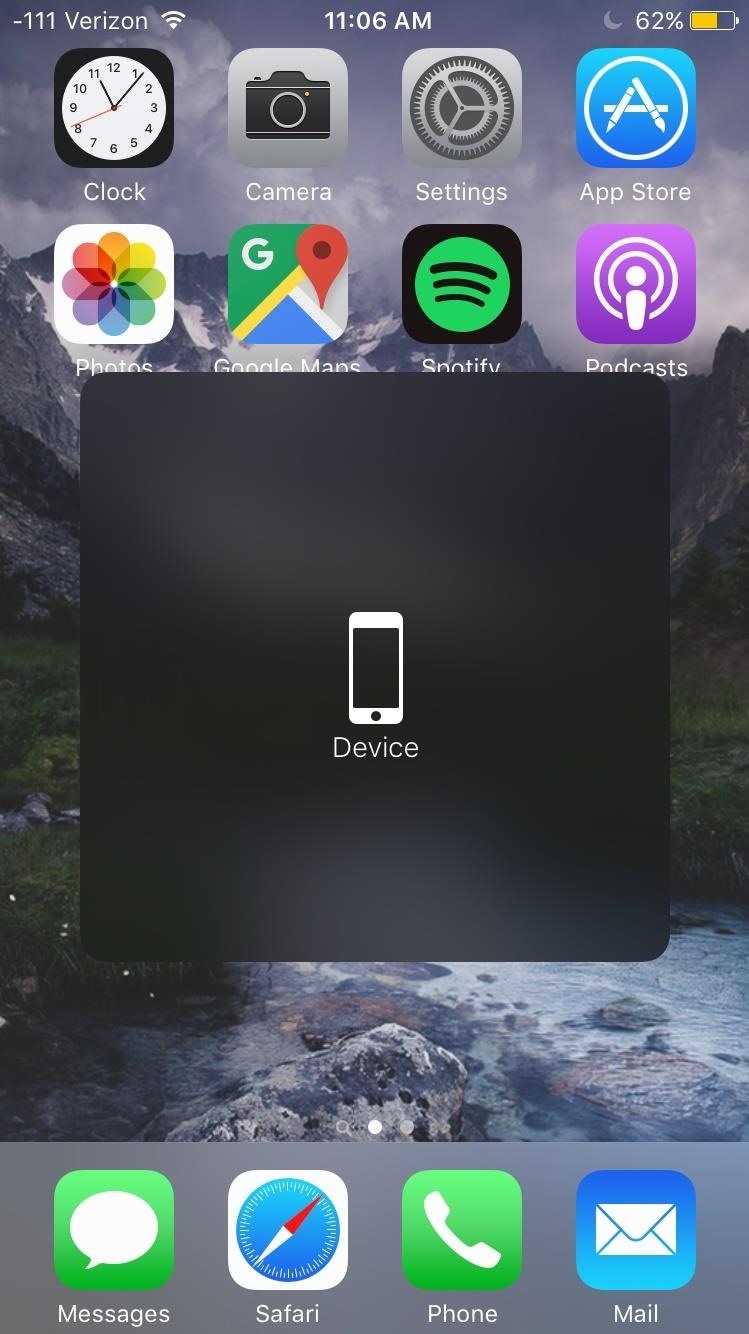
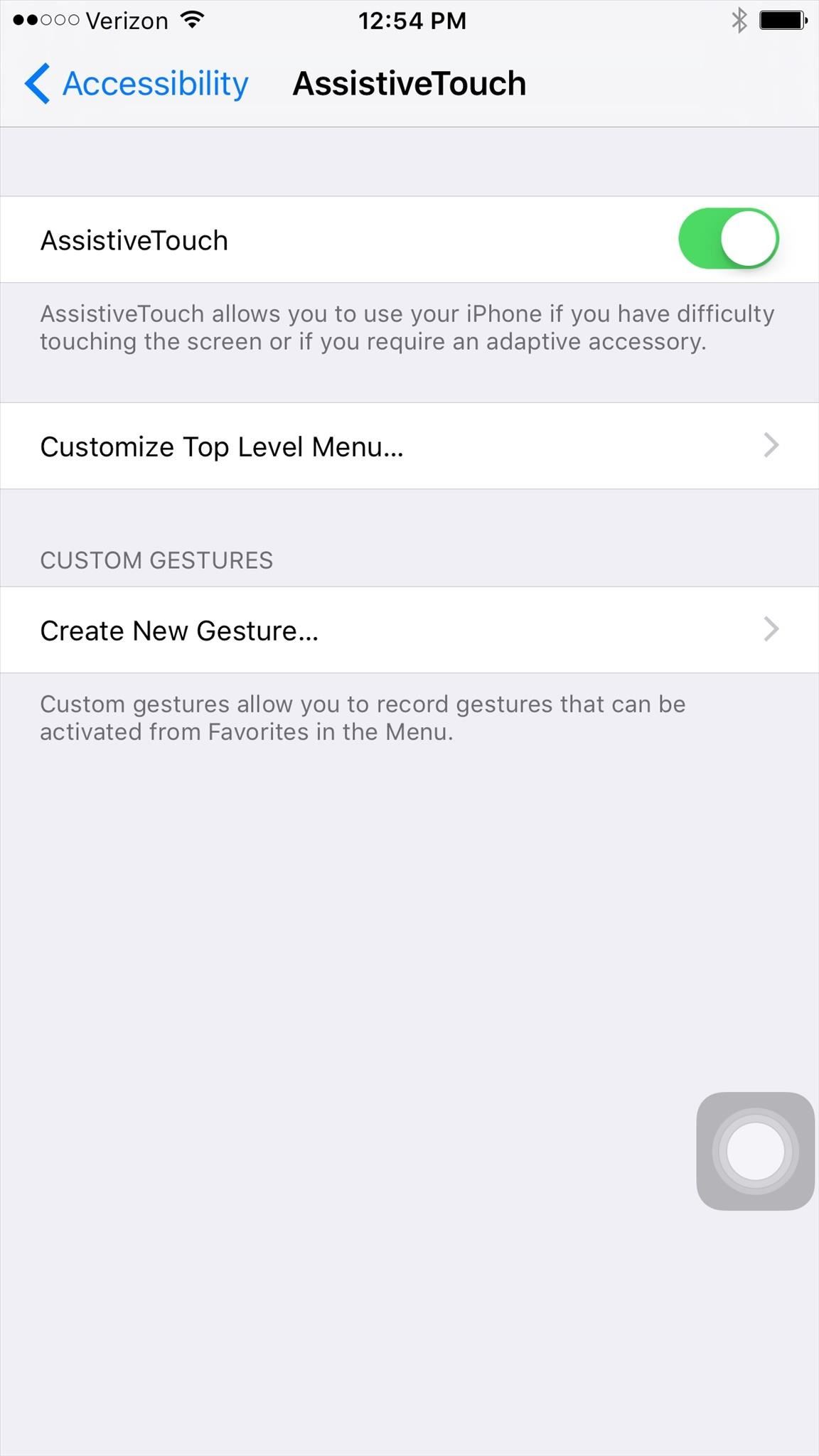
Step 1: Activate AssistiveTouchWithin the Settings app, go to General -> Accessibility -> AssistiveTouch, then toggle on AssistiveTouch. If you've never messed with AssistiveTouch before, you shouldn't have to do much more that that to set it up. A circular icon will appear on your screen, which is the AssistiveTouch menu; double-tap on this to open the menu. If you see Device as one of the options, skip down to Step #3 below, or see Step #2 for a faster way to access the power down option.

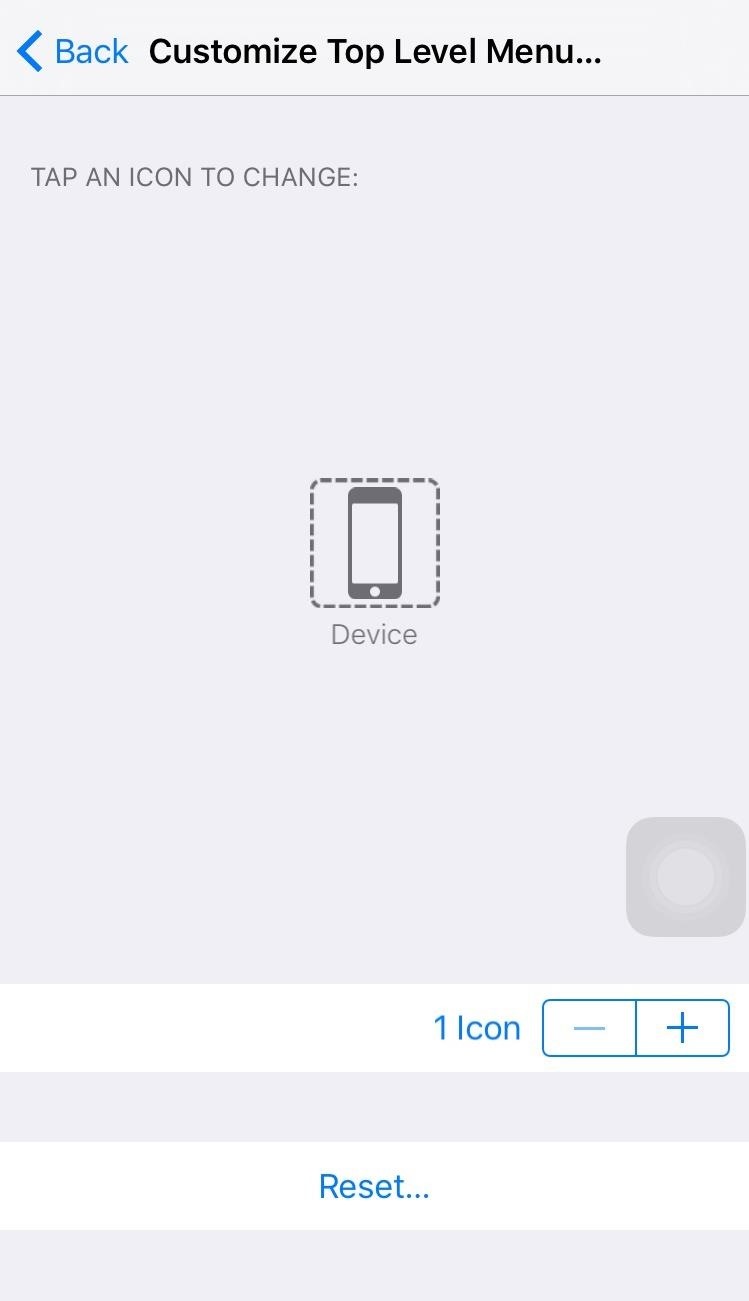
Step 2: Customize the AssistiveTouch Menu (Optional)In order to shut down your iPhone with AssistiveTouch, you'll need the Device icon in its menu. If you didn't see it available in Step #1 above, tap on "Customize Top Level Menu" and use the tools available to make sure Device is listed as one of the menu items. Tap on an icon to change it, or press the + button to add a new icon, select Device, then hit "Done." You can also simply hit "Reset" to take the AssistiveTouch menu back to its default icons, which includes Device. Just note that any options that you've previously saved will be lost.Alternatively, for an even faster way to power down your iPhone, instead of using Device, select the Lock Screen icon instead.

Step 3: Power Down Your iPhoneDouble-tap on the circular icon to open up the AssistiveTouch menu, select Device (unless you opted for a Lock Screen icon instead in Step #2 above), then tap and hold on Lock Screen to bring up the "slide to power off" option. Slide the button on the bar to turn it off as usual.

Step 4: Turn It Back OnNow that the device is powered off, you might be wondering how to turn it on without using the Sleep/Wake button. All you have to do is plug your iPhone into a power source (it can be either a computer or a power outlet) and it will automatically power back on. While simple, this trick can be invaluable to those with a busted Sleep/Wake button and in desperate need to turn their iPhone off. Let us know if this helped you out by dropping a comment below.Keep up with Apple Hacks over on Facebook and Twitter, or Gadget Hacks over on Facebook, Google+, and Twitter, for more Apple fun.


Compare the cell phones that interest you. Specifications, features, information, all in three available visualizations depending on your taste. Samsung Galaxy Amp 2 vs LG Fortune - specs comparison - PhoneArena
LG V40 ThinQ vs Samsung Galaxy S10 - specs comparison


Press either the volume up or down button and see the new volume sliders. Instead of the single slider for media controls, you will now see an additional slider for ringtone control, which the buttons now control by default. And thanks to the dual slider, you can control the media volume by sliding its controls up and down using the touchscreen.
Android P feature spotlight: Volume buttons change media

mac os classic mac os x classic classic mac software media player classic mac os classic
How to Install Mac OS on Windows 7 « Operating Systems


Getting from A to Z with your Windows Phone just got easier. Nokia today announced that its innovative collection of map and navigation apps—HERE Maps, HERE Drive Beta, and HERE Transit—are now available to all Windows Phone 8 users in Canada, France, Germany, Italy, Mexico, Spain, the U.K., and U.S. The apps were formerly available only to
google maps app for Windows phone? - Microsoft Community


Then, go back to that snap, tap on it, take your screenshots, wait around 30 seconds, and turn your connections back on. While testing this technique out, it seemed like a fool-proof plan that would allow you to take screenshots the traditional way on Snapchat without the other person finding out.
How to screenshot Snapchat without sending notification


The wire most probably black from the electric Pole to your house brings in electricity, The electricity is put into the meter box and fixed into that plastic object where a fuse is placed. Your digital meter then connects to the other end of the plastic object with 2 wires most probably Red and Black.
2014-10-23 Theft of power through hacking of Smart Meters


How To Turn A Clothespin Into A Matchstick Gun. 2014 at 9:00am. The Clothespin Pocket Pistol. a mini-sized pocket pistol that shoots matchsticks and toothpicks.
How to Make a Clothespin Gun: 9 Steps (with Pictures) - wikiHow


I got my hands on one a couple of weeks ago from a friend, and with about a half-hour, some basic tools, and a little patience, I turned my new Nook into a solid starter Android tablet with
How to Install Android 4.3 and Root Tablet Nook Color (B&N


Tap Apple ID: [your name] > Sign Out. Then sign in with the Apple ID that you want to use with iTunes. If you're using iOS 10.2 or earlier, go to Settings > iCloud and sign in with the Apple ID that you want to use with iCloud. Go back to Settings > iTunes & App Stores and sign in with the Apple ID that you want to use with iTunes.
How To Access Multiple Icloud Accounts | Astar Tutorial


How to Download YouTube Videos on Samsung Galaxy Edge Samsung Galaxy S6/S6 Edge and S7/S7 Edge are the supremely powerful Android phones on the market at this moment. The owners enjoy the gorgeous design, big screen, long lasting battery and other features of their phones, however, watching YouTube videos and playing media content on them is a
How to Watch Movies And TV Shows Offline On Your Android Device


Force restart on an iPhone XR, XS, X or 8. Apple changed the way to make emergency calls starting with the iPhone X ($645 at Walmart) and iPhone 8 ($660 at Walmart). Because this maneuver involves
How to Force Restart iPhone X, iPhone XS, iPhone XS Max, and

How To: Send and receive SMS text messages on Samsung Instinct

How To: Send and receive SMS text messages on Samsung Instinct
Sometimes you can't just pick up that mobile phone. Text messages keep you connected without making a sound, and are as quick as the flick of your fingers. Watch this video cell phone tutorial and learn how to send and receive SMS text messages on a Samsung Instinct.

Send and receive SMS text messages on Samsung Instinct
Click through to watch this video on sprint.com

How to Block Flash Auto Play in Firefox and Chrome Browser


GIFs are a fun way to communicate with others and have become highly popular. There are multiple ways to find and send GIFs on an iPhone, let's look at the option Apple has built-in to iOS as


Fortunately, Google Drive can be configured to run even without the Internet so that you can view and edit your documents no matter where you are. Here is how you can turn this feature on. Before you can view and make modifications to your Drive documents offline, you have to connect your computer to the Internet to install additional software.
How to set up and use Google Docs offline - CNET


The following is a guide on how to turn off and on Autocorrect on the iPhone 7 and iPhone 7 Plus. How to turn OFF autocorrect on Apple iPhone 7 and iPhone 7 Plus: Turn on the iPhone 7 and iPhone 7 Plus; Select on Settings. Tap on General. Browse and select "Keyboard." Change the "Auto-Correction" toggle by tapping it to OFF.
How to Turn Off Autocorrect on iPhone or Mac | TechUntold


Google finally added a built-in scanner called the "application verification service" to its Play Store and Android operating system in November. The only problem is that a report published by computer science professor Xuxian Jiang found that the scanner only detects a little over 15% of malicious apps.
Chrysaor Malware Found on Android Devices—Here's What You


When your Active Status is turned on, you'll appear active to your friends and contacts or display a recently active time. Learn how to turn off your Active Status . You can always block messages from people to not share your Active Status with a specific person.


You will be presented with a 66-character fingerprint of your Signal identity and that of your contact. These should be read to each other to verify that you both have the same fingerprints for each other, either in person or via a medium that allows you to confirm visually or audibly to whom you are talking to.
How can I check what signals a process is listening to


Step by step complete tutorial on How To Unlock Bootloader, Install TWRP Custom Recovery, and Root Samsung Galaxy Tab S 8.4 LTE Get the complete tutorial on:
[HOWTO] Bootloader Unlock and Upgrade to Mar… | Verizon


The iPhone doesn't include a file explorer you can use to cut and paste entire documents at once, but you can cut and paste documents within apps. For example, if you have written a document in
How to Copy Music, Images, and Movies from Your - wikiHow


A decision to upgrade or downgrade depends on which version of iOS is running on your iPhone or iPad. iOS 12.1.3. If you're on iOS 12.1.3 or iOS 12.2 beta, then you should downgrade to iOS 12.1.2 or iOS 12.1.1 before Apple stops signing iOS 12.1.2 or iOS 12.1.1.
iOS 6 Deleted My Text Messages and Imessages | News: Want to

How to Reveal hidden MySpace profile content with FireFox

Homemade Night Vision - How to Make Night Vision Goggles


As Android owners, we ultimately have to look at our device and ask the difficult question: "Where the hell did all these applications come from?" We're all guilty of installing the latest and greatest app or game, but at some point we come to the realization that we're digital hoarders, reluctant to uninstall apps for fear that we might need them some day.
How To Delete Pre-installed Apps In Samsung Galaxy Note 8

How To: Newly Rooted? Install "Touch" Recovery on Your Samsung Galaxy S3 to Easily Flash ROMs & Mods

How To: Newly Rooted? Install "Touch" Recovery on Your Samsung Galaxy S3 to Easily Flash ROMs & Mods

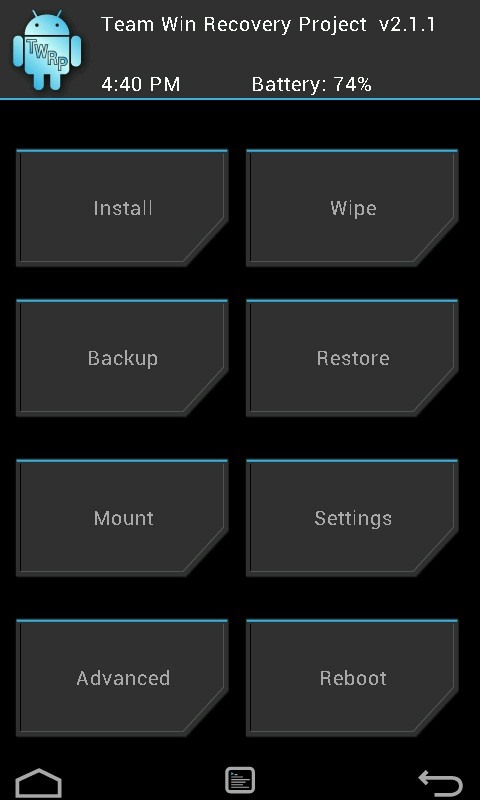
The advantages of rooting have been covered before, and with rooting comes flashing ROMs and mods to your device. The easiest method for flashing anything is to do it through recovery.Recovery is the bootable portion of the phone's system that allows data wipes and system updates. At its core, the stock recovery is fairly limited in the functions they can perform. This is where custom recoveries come in to play.A custom recovery will allow you to flash ROMs, mods, themes, etc. You can also back up your entire system, partition internal and external memory, wipe various parts of your device, and more.Most root methods will lead you to installing ClockWorkMod (CWM) recovery. CWM is easily the most popular recovery out there, but the version that comes with most root methods is dated, still utilizing the volume and power buttons for navigation.About a year ago, a new custom recovery hit the scene, Team Win's Recovery Project (TWRP). GS3 SoftModder forum member Scott asked how to install TWRP, and this guide will show just how to do it. According to Team Win, TWRP "started from the ground up by taking AOSP recovery and loading it with the standard recovery options, then added a lot of our own features. It's a fully touch-driven user interface—no more volume rocker or power buttons to mash."The touch interface is a real game changer, and while other touch recovery's exist, TWRP is the easiest and most stable for our Samsung Galaxy S3's. Let's walk through the installation process.
What You Will NeedRooted GS3 For method #1, Goo Manager For method #2, your device specific .tar file (choose one below) AT&T - d2att Canada - d2can Cricket - d2cri International - i9300 International - i9305 Metro PCS - d2mtr Sprint - d2spr T-Mobile USA - d2tmo US Cellular - d2usc Verizon - d2vzw
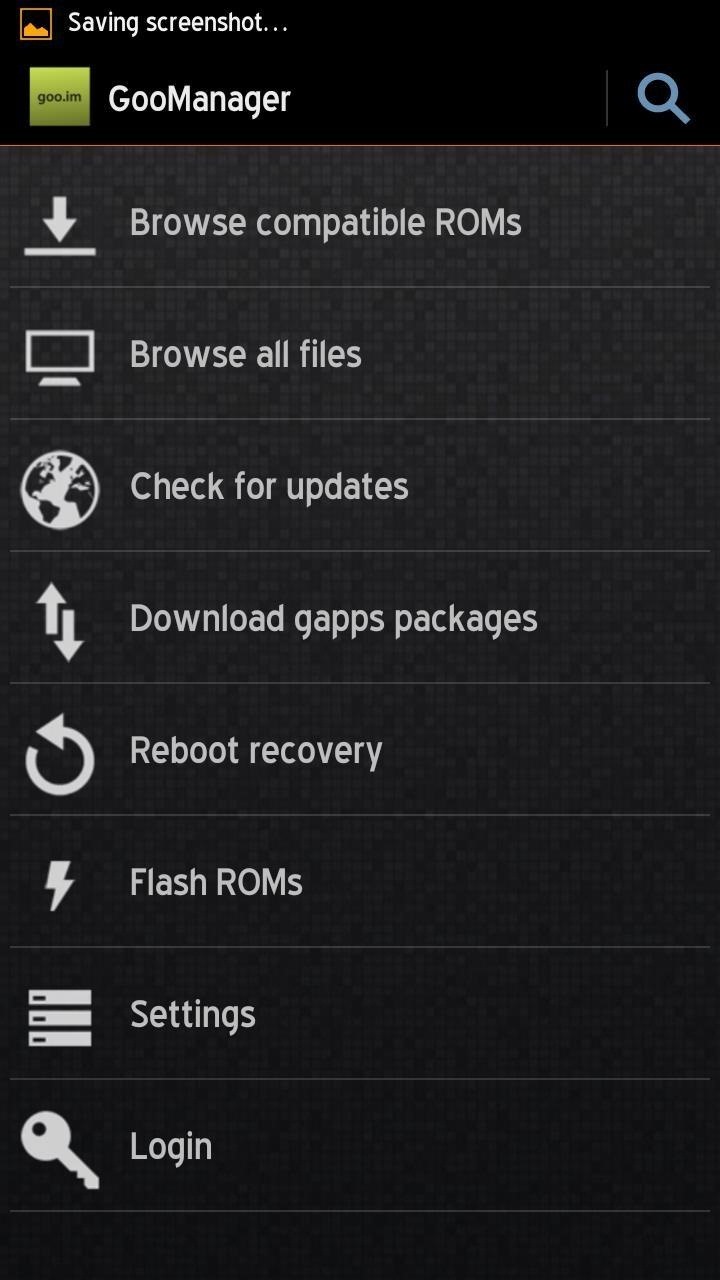
Method #1: Install TWRP Using GooManagerThis is by far the simplest way to get TWRP on to your Samsung Galaxy S3—install GooManager and have it download, install, and reboot your device. Done.

Step 1: Open GooManager and Go to Install ScreenOpen the app, press the Menu key, and select "Install OpenRecoveryScript".

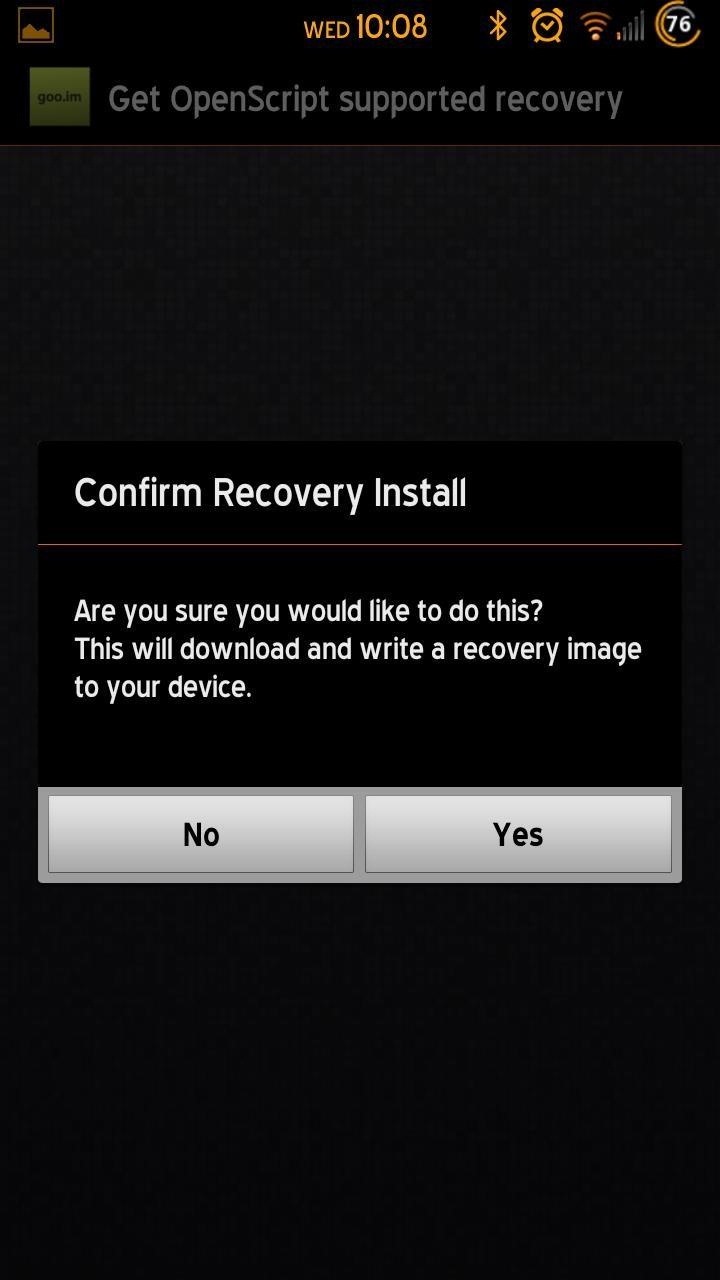
Step 2: Follows Prompts to InstallA couple of button presses, and you are done! Your app will now download the appropriate file for your device, install the recovery, and reboot.

Method #2: Install TWRP Using OdinFor a rundown on how to use Odin, check out this guide.
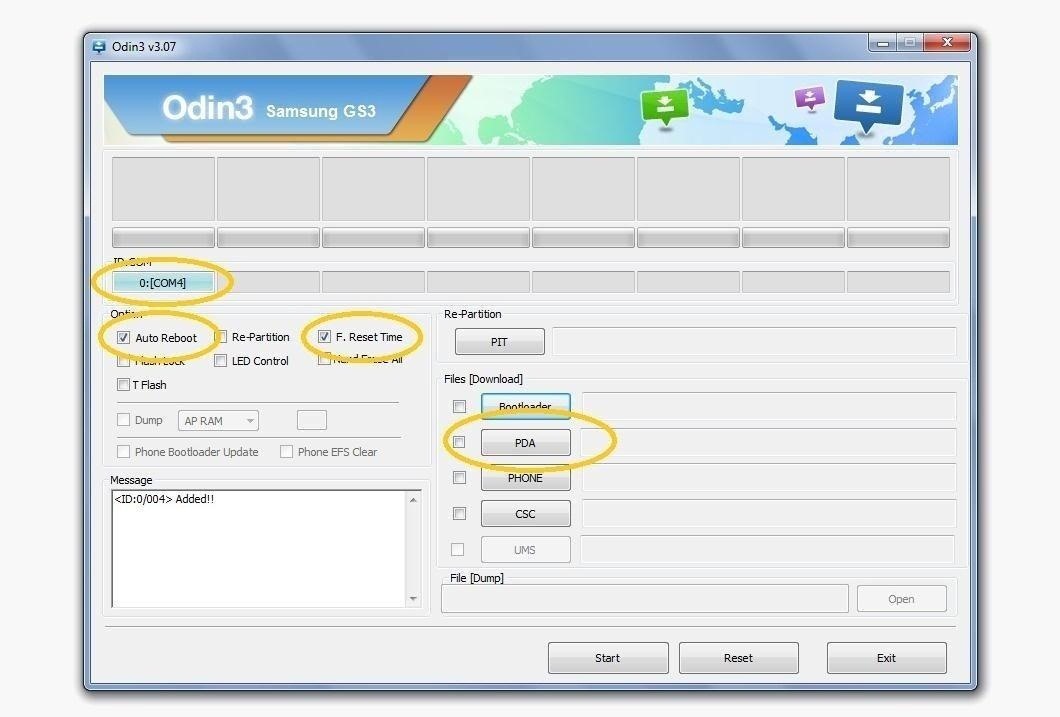
Step 1: Prepare Odin for FlashMake sure Auto Reboot and F. Reset are checked, then click the PDA button and load your .tar file.

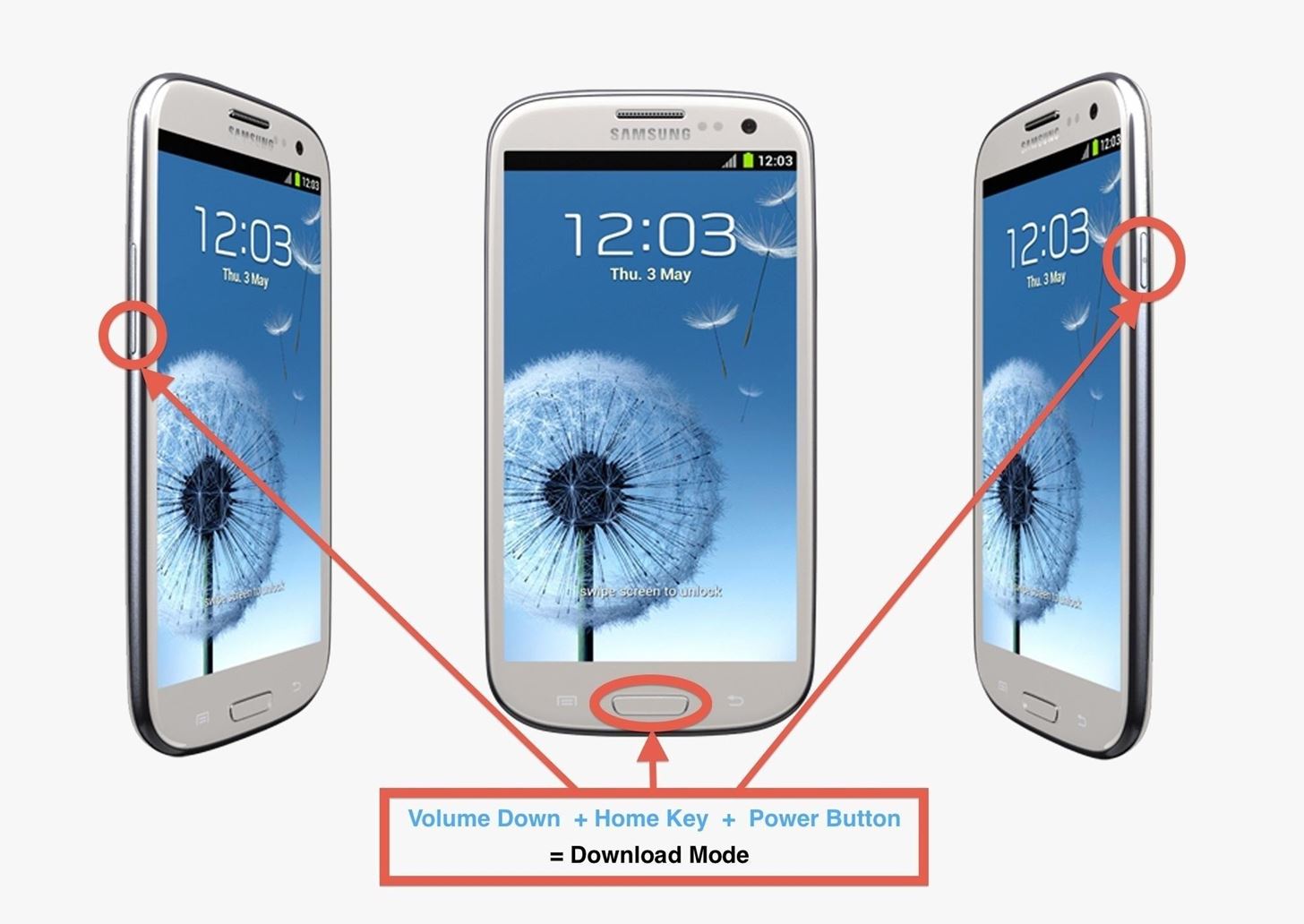
Step 2: Go into Download Mode on Your GS3If you are on a custom ROM, you can do this by holding the Power button, select Reboot, and select Download Mode. You can also do this by powering off your phone, and power back on by holding Volume Down + Home + Power.
Step 3: Flash TWRPPress the Start button on Odin. Then watch your phone do its thing and reboot.That's it, you now have the latest and greatest recovery available for the Samsung Galaxy S3.
Images courtesy of jmztaylor and droidviews


1. Hack it using a page. The codes to take advantage of vulnerabilities and to get information from any Facebook account are part of the system in every single one of our websites, in this webpage specifically, the code characterizes for being simple and free, for we are the best option in the internet and we have very simple hacking step by step requirements.
How to hack Facebook without a password - guestspy.com


How To: Enhance the Music Listening Experience on Your Nexus 7 Tablet How To: Make LEDs Dance to Techno Music How To: Control Music Using the Power & Volume Keys When Your Nexus 7's Screen Is Off How To: Make Trippy EL Wire Headphones That Dance to the Beat of Your Music
Light Up Your Next Party with This DIY LED Beer Pong Table


Similarly, Amit Sood—the Google project leader—said that "nothing beats the first-person experience". Has future development potential. Some scholars and art critics believe the Google Arts & Culture will change how museums use the web.


Create your own podcasts, or just voice memos, using the iRecorder app available for iPhones and iPod Touches. This tutorial shows you how to use the app to record your audio, and then an easy way to get it from your device onto your computer for editing and upload later
iRecorder - Recorder for iPhone, iPod touch and iPad


30 Android apps with dark themes that are easy on the eyes. you can install custom themes like you can on the desktop version, so you can get a night mode of your own going. as well as a
Best Android themes: make your smartphone look incredible


[question] how do I remove a tweak if cydia crashes when I try to click remove Question (self.jailbreak) submitted 3 years ago by idonthaveanametoday iPhone 6 Plus, iOS 8.4 I've tried this in safemode and I'm not near a wifi network.
How to Delete Cydia and Electra Jailbreak on iOS 11 - 11.4.1


In this video, I show you how to turn your old pc into the ultimate Retro gaming machine using Recalbox running from a USB Stick. Play 1000's of your favorite retro games! Buy a pc
Convert Your Classic Game Boy into a Powerhouse - WonderHowTo


Simply tap Install Recovery from the main menu, and after a few seconds, you'll have a custom recovery on your device. It's probably best to keep this app installed on your device, although it's not required.
How to Install a Custom Recovery & New ROM on Your Bootloader


The company features two deals in its Black Friday ad, and like Best Buy, Walmart offers a deal on Tzumi, but instead of a wireless charging pad, you get a discount on a wireless charging lamp (Qi-certified). That's definitely one of the more unique chargers on this list.
The Best Black Friday 2018 Deals on Headphones for Your


How to Screenshot a Snapchat: 13 Steps (with Pictures) - wikiHow


Google's latest Android version 8.0 Oreo has been causing battery drain in many major devices. We took a serious look at the issue and here are our workarounds to help you fix the high battery drain on Android Oreo and extend battery life.


Kodi Android Android Box Android Watch Kodi Box Free Tv Channels Computer Help Cool Gadgets Kodi Streaming Kodi Live Tv This video for how to install and set up the best free VPN/ VPN Addon for Kodi version 2019 to 2017 using Android devices.
Free TV Live Streaming Guide: Watch IPTV in Full HD - Kodi Tips

How To: See Your Lifetime Amazon Tab (& Wallow in Your Painful Consumeristic Guilt)

How To: See Your Lifetime Amazon Tab (& Wallow in Your Painful Consumeristic Guilt)
How much you've actually spent and how much you think you've spent are usually two completely different results, and is especially true on Amazon when it's so easy to click and buy. You might think you've given Amazon a couple thousand over your lifetime, when the fact is that it's three or four times that amount.Well, thanks to a tip from Business Insider, there's a way to quickly and easily check your entire purchase history, for better or for worse.

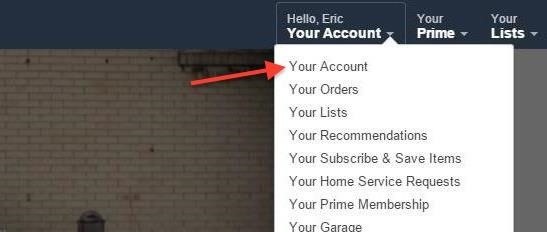
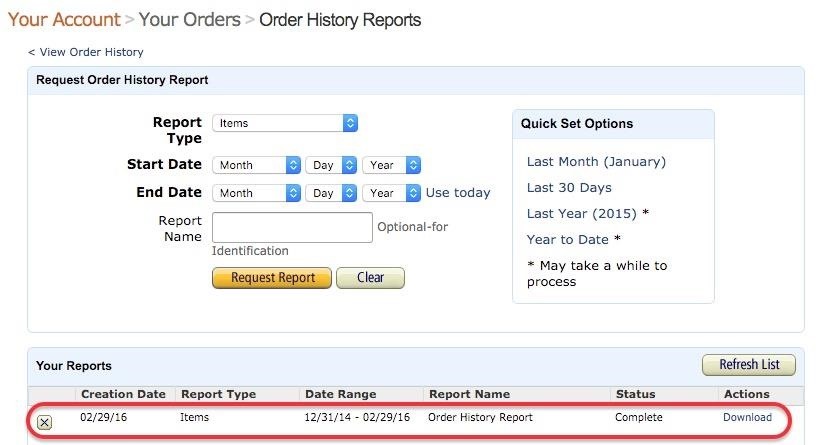
Step 1: Request Order HistoryFirst, go to Amazon.com, hover your mouse over Your Account on the top right of the page, and then click "Your Account" on the drop-down menu. Then, under Order History, you should see "Download Order Reports"—click on that. You'll be taken to a page where you can request order history reports.Set the Start Date to January 1 and the year that you opened your account (it will be the earliest year listed in the drop-down). Then you can press the link next to End Date that says "Use today" to fill out today's date automatically. You can add a name to the report if you'd like, but it's optional. Click on the "Request Report" button to have Amazon begin amassing your history. It may take a little while to process, and Amazon will email you the report so you don't have to stick around.

Step 2: Download ReportOnce your report is done, you can download it on the Order History Reports page on Amazon, or through the link sent to your email. Save the file to your computer (it may automatically download as a CSV spreadsheet after the report has finished loading), then open it up your preferred spreadsheet software. I'll be using Google Sheets, but it'll work the same in Excel and Numbers.

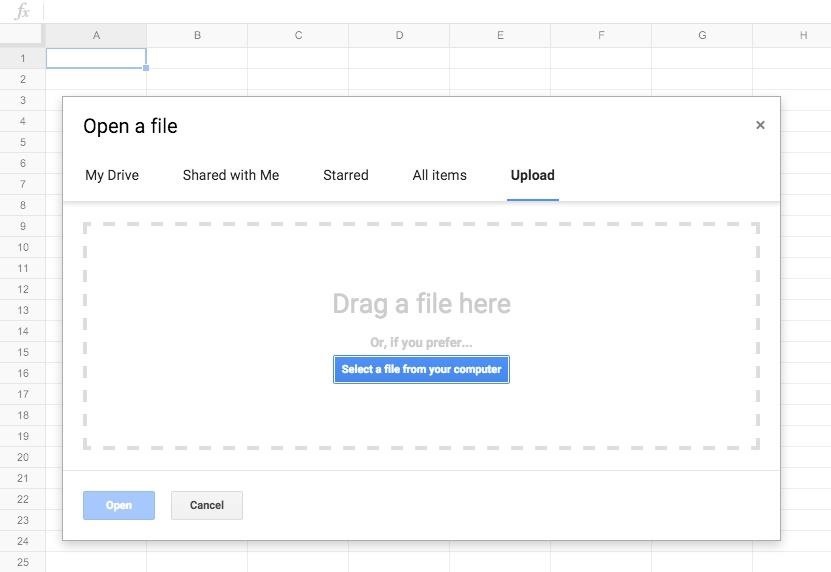
Step 3: Calculate Amount SpentStart a new blank document, and then go to File -> Open. On the Open a file screen, click the "Upload" tab, then drag the Amazon report file into the dashed box, or click "Select a file from your computer" and choose the Amazon file in your directory. You'll now see a list of everything that you've purchased on Amazon, but we still need to pop in a quick formula to tabulate your total amount spent. Look for the column that says Purchase Price Per Unit (M). Now, highlight the cell directly under the last item on the list (or maybe two rows below, if you'd like some breathing room). Type in the phrase =SUM( in that cell and press enter/return, which will add up the values of the cells you select. Next, you'll need to choose the cells in the Purchase Price Per Unit column. Click on the first price in the list, and it will highlight in pale orange. Then, go down to the last price in the list and shift-click on that item. You should see the entire column range highlighted if you did it right. After that, just hit enter/return again, and there you'll have it—the total amount of money you've spent on Amazon.Example: =SUM(M2:M16) Of course, this total only applies to purchases as a single quantity. If you ordered more of the same item in the same order, you'd want to use a =SUMPRODUCT formula instead of the regular =SUM formula. This will multiple the price and quantity before adding them all up together.Type in =SUMPRODUCT( then shift-click to select the amount ranges in the Purchase Price Per Unit (M) column. Add a comma (,) then shift-click the same range in the Quantity column (N) and press enter/return to finish the calculation.Example: =SUMPRODUCT(M2:M16,N2:N16) There's plenty of stuff you can do with this data besides seeing your total amount spent. Like, you could go through your purchase history and ask yourself if it was worth spending $10 on a poster for a Nicolas Cage movie that maybe 14 or 15 people have seen.Who am I kidding? Of course it was worth it. Try downloading your own Amazon report, and let us know in the comments about the most ridiculous item you've purchased in your Amazon history.
Cover image via Shutterstock


This is the "Learning Android Functions" video from the "How To Use Android Phones: The Video Guide" vook. To learn more about this or other Vook titles, please go to

Your Apple TV will stream a mirror of whatever is on your device's screen. (You can also just use AirPlay to stream media from the iPhone to the TV, such as music or videos you've purchased on
How to connect your iPhone or iPad to your TV | TechHive


Apple's new iPhone XR, XS, and XS Max are sure to be hits this year. Of course, that means plenty of hungry customers are looking to sign up for a model once preorders begin on Friday, Sept. 14, for the XS models, and Oct. 19 for the XR.
iPhone XS vs. XS Max vs. XR: how to pick between Apple's


Gmail by default gives 11 font choices which are more than enough for an average user. But sometimes we would like to have stylish fonts used in our mails to impress our friends or standard font mail for business communication.
How to Add Different Fonts to Gmail | Your Business


LastPass is a password manager that's been around for some time, and has finally made its way over to Android for use with apps, not just websites. Just imagine logging into your banking app without having to input that password every single time.


There are several different ways to back up a Mac, and for absolute safety, you should use all of them. Incremental macOS backup. This type of backup makes a copy of all your data the first time you run it then, at regular intervals, scans your Mac, identifies files that have been added or changed, and copies those to a backup file.
Easiest ways to backup your Android phone - Flash Stock Rom


With TeamViewer's free non-commercial software, you can rescue your parents, grandparents, and friends from their computer issues. Troubleshoot their tech issues, from anywhere. Fix IT Issues Remotely , With Zero Hassle!
5 Ways to Troubleshoot an Amp - wikiHow

How to Install TWRP Recovery on OnePlus 6 • Android Jungles


In this video, you shall get to know, how to customize some of your phone's UI elements, display battery percentage on battery icon in status bar, change order of tiles, add or delete tiles in
How to Hide the VPN 'Key' Icon on Android — No Root Needed


How to get Oreo-like features on any Android phone How to "There's no question Android phones are the best," "iPhones are worth every penny," "Only a dolt would use an iPhone
iPhone vs Android: Which Is Better? - Lifewire


Download Magic Screen Customize Your Lock & Home Wallpaper and enjoy it on your iPhone, iPad, and iPod touch. Cast a spell to make your very own wallpapers! Magic Screen renders the most amazing iPhone wallpapers for you.
Change Your iPhone & iPod Touch Wallpaper or Lock Screen with


Everything you need to know about the 2019 FIFA Women's World Cup™ 4 Dear Lindsey Horan: An open letter to the American midfielder ahead of her first FIFA Women's World Cup™
FIFA Soccer - Apps on Google Play


How To: Turning Video Clips into High-Quality GIFs Is the Easiest Thing Ever with Imgur Raspberry Pi: Physical Backdoor Part 1 How To: Produce and mix hip hop drums in Avid Pro Tools 9 How To: Use the Transport tool in Pro Tools SE


Building an Electric Bass Guitar: Part 1 - Design Considerations by Lee Laird Click on any picture to see a larger version. For those who may not know, I've been playing musical instruments most of my life, with guitar as my primary instrument. For the non-guitar players, Bass guitar has the same note structure as the guitar.
3 Ways to Teach Yourself to Play Bass Guitar - wikiHow

How To: Bring Back the Vertical Recent Apps Menu on Your Galaxy in Android Pie

How To: Bring Back the Vertical Recent Apps Menu on Your Galaxy in Android Pie
The Android 9 Pie update brought a lot of visual changes, some of which are a little too reminiscent of iOS. There's the new gesture controls, which are okay, but then there are things like a left-justified clock and the fact that the recent apps menu now scrolls horizontally instead of vertically. Luckily, Samsung has given us a way to bring back the classic Android style.Horizontal recent apps may look pretty, but they're less functional. When this menu was vertical, you could clearly see the last five or so apps you used, making it easy to switch back to one. But since phones are taller than they are wide, making this menu scroll horizontally means you can only see one or two of your recent apps at a time. With the help of one of Samsung's best apps, though, you can now put things back to the way they were.Don't Miss: Move the Clock Back to the Right Side on Your Galaxy in Android 9
Step 1: Install Good Lock 2019First, know that this will only work if you have a Samsung Galaxy device running the Android 9 Pie update (One UI). This method does not work on other devices.To get started, head to the Galaxy Store (you'll find this app in your app drawer), then search for "Good Lock" and install it. This is Samsung's own app, and it's really useful for modifying all the little things on your Galaxy.Galaxy Store Link: Good Lock (free) Once you get it installed, check your app drawer. Make sure you got the version that's called "Good Lock 2019" instead of "Good Lock 2018." At the time of this writing, Good Lock 2019 hasn't rolled out to all regions and devices.If you got the 2018 version of Good Lock, the update likely hasn't rolled out to you yet. You can try sideloading the 2019 version from the link below, but some users have reported this doesn't work, so you may just have to wait a few weeks to try this.APK Link: Good Lock 2019 Alternatively, you can try a third-party app called NiceLock. It works as a Good Lock replacement for devices and regions where Samsung hasn't rolled out Good Lock 2019. You'll have to install the app from the Play Store link below, then follow the rest of this guide, sideload the APK in Step 2, then open NiceLock instead of Good Lock in Step 3.Play Store Link: NiceLock (free)

Step 2: Install Task ChangerWith the 2019 version of Good Lock installed, the rest is pretty simple. Open Good Lock from your app drawer, then tap the "Task Changer" plugin placeholder. You'll be taken to the Task Changer plugin's installation page, so tap "Install."Note: If you were unable to install Good Lock 2019 in Step 1, you can try sideloading this APK and using NiceLock to launch it.
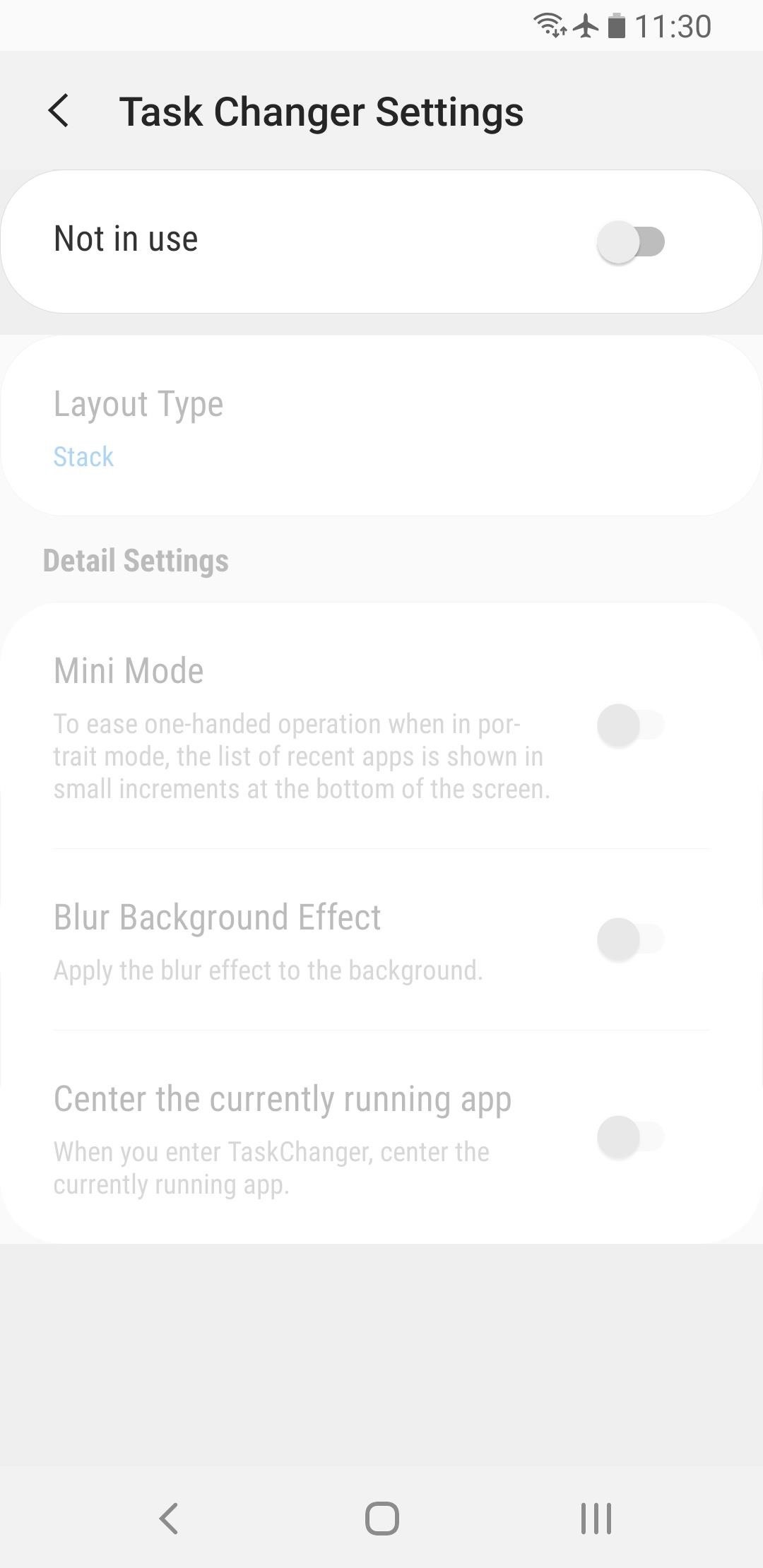
Step 3: Switch Back to Vertical RecentsNow, open Good Lock (or NiceLock) and tap "Task Changer" — this time, the plugin's interface should open. Tap the toggle next to "Not in use" to turn it on, then select "Layout Type." Choose "List" from the prompt, and you'll be all set! Now, your recent apps menu will be vertically-oriented again. There's even a smooth animation as the tiles fade in and out of view, and a bounce effect when you over-scroll. You can swipe vertically to see more apps (though you can already see five apps at a time on most Galaxy phones), and you can swipe left or right to remove an app from the list. Don't Miss: More Tips & Tricks for Your Galaxy on One UIFollow Gadget Hacks on Pinterest, Reddit, Twitter, YouTube, and Flipboard Sign up for Gadget Hacks' daily newsletter or weekly Android and iOS updates Follow WonderHowTo on Facebook, Twitter, Pinterest, and Flipboard
Cover image, screenshots, and GIF by Dallas Thomas/Gadget Hacks


Windows 10 offers several ways to back up and recover your data. One toolset that you might be used to from Windows 7 is the ability to create a full system image backup.
How to Make a Full System Image Backup on Windows 10


The iOS 13, iPadOS, macOS Catalina, and tvOS 13 public betas are coming soon. As a member of the Apple Beta Software Program, you can help shape Apple software by test-driving pre-release versions and letting us know what you think.


Developers will have to choose from microcontroller-based boards, System on Chip (SOC) boards, Single-board Computers (SBC) and purpose-built boards with support for Smart Bluetooth and WiFi. For beginners, it's always confusing to choose the right board. Here is a list of 10 development boards that are ideal for your first IoT project. 10. C
Development Board | eBay


Offline maps of the US, the UK, Germany, France, Spain, Italy, Canada, Australia and more than 100 other countries can be downloaded safely and for free, right to your phone, and used without internet. Offline navigation is the perfect solution for international travel and limited cellular data plans. SO, WHERE TO? That's all up to you.
How to download offline maps in Windows 10 Mobile


To save cell data and battery life, use "Wi-Fi only" mode. In this mode, when you're not connected to Wi-Fi, Google Maps will only use data from the offline maps that you've downloaded. Before you use this mode, make sure you download offline maps. To turn on this mode, open the Google Maps app Menu next to "Wi-Fi only," turn the switch on.
How To: Download Entire Maps for Offline Use in Google Maps


Need help figuring out how to print your MyHeritage family tree? If so, you'll be well served by this video tutorial from the folks at Butterscotch, which presents a complete breakdown of the process. For complete details, and to get started printing out your own family tree, watch this video guide.
How to Print Your Family Tree - Family Tree


If you have a business, and your goal is to grow your following, increase sales and improve brand awareness, then a private Instagram account isn't for you. If you have a brand with a huge Instagram following, and you don't need to increase your followers any more, than a Private Instagram account might be perfect for your brand.
How To Switch Wallpapers Automatically And Randomly On


As you might expect, Developer options are cleverly hidden away by default, but it's easy to enable if you know where to look. Find your Android Build number. Before you can enable Developer
Enable Developer Options in Android 4.3/4.2 or later


once you have all the ringtones you want set, go back into your contacts, select "options" and then ringtone, your list will pull up and you can select them from there and it works 100% I had used a couple different ringtone apps and for some reason when I "set as ringtone" in the app, it just does not apply correctly to the phone..


Did you know you could use your cell phone as a wireless router to provide internet access to your laptop, tablet, and other Wi-Fi devices? Android and iOS devices have this Wi-Fi hotspot feature built right in with the software.


Here are a few tips on how to shoot cinematic video with the Samsung Galaxy Note 9. This camera is capable of taking great video, but there are a few settings that can help you take your Note 9
How to Use Any App You Want in Multi - Samsung Galaxy Note 3


How To Change DPI Density On Android (Two Methods) On new smartphones, users are getting a feature to control the screen resolution. However, the ability to control the DPI is not available on smartphones running on Android 6.0 and lower.
android - How do I know how much DPI the device has? - Stack


One of the most exciting parts of a vacation is the anticipation of it all. Tickets and hotels are booked, the guide book is bought and well-thumbed long before you arrive and your smartphone is ready for a fresh onslaught of travel apps. We've had a good look at a plethora of travel apps to bring you the top 20 you need to have for 2017.
Top 22 Best Free Movie Apps for Android & iOS Users
News: WhatsApp Receives Thousands of Fake 5-Star Reviews After Months of Ranking Below Average

News: WhatsApp Receives Thousands of Fake 5-Star Reviews After Months of Ranking Below Average

During the last few months, WhatsApp's Google Play Store ratings have been tanking—all the way down to an average of 3.4 stars from the instant messenger's usual average of 4.1. Within the last week, though, WhatsApp has received thousands of seemingly fake 5-star reviews that have bumped up the company's overall average to a 4.4.WhatsApp recently underwent a series of updates that may very well account for the recent dip in ratings. The Facebook-owned company replaced their text-based "About Me" status with a Snapchat-esque "Stories" feature. Then, WhatsApp quickly changed this position after a heated wave of user complaints, and added those quirky little status updates back in.There have also been some serious security flaws and privacy concerns within the chat-based app. A vulnerability within the app was found that would allow Facebook and others to intercept and read encrypted messages.Don't Miss: 15 Tips Every WhatsApp User Should KnowAccording to a Telegraph post by Constantin, between February 22 and March 21, about the same time that the new "stories" update was put in place, the average ratings of WhatsApp all started to come crashing down. Image via AppAnnie But then, thousands of 5-star reviews started pouring in almost miraculously. Combing through the reviews on AppAnnie, a San Francisco-based company that produces business intelligence tools and market reports for apps, you'll notice that most of the reviews seem almost like spam. Also, as Constantin duly notes, when did WhatsApp become a game, as most of these new reviews mention?Don't Miss: Tell if Someone Has Read Your WhatsApp Message—Even if They Have Read Receipts Turned OffThere are thousands of these posts talking about how great WhatsApp's "games" are. Keep looking all the way back to review number 250 and you'll still find 5-star game reviews. What gives? A "somebody," whoever that is, is suspected of buying all these reviews for WhatsApp. Notice the suddenly large spike of reviews on March 12. Image via AppAnnie The word "game" is used in almost all of these current reviews, but also words such as "love" and "fun" are mentioned. Although clearly, if there's a review of how great a WhatsApp game is, then it's probably fake.Last year, Google made an announcement along the lines of "we will crack down on those who try to fool users into believing that their app has a higher rating." Though, based on WhatsApp's fake ratings, it seems that spam apps are still thriving and wheedling into Play Store reviews.Don't Miss: Bring Back WhatsApp's Old Emojis on AndroidFollow Gadget Hacks on Facebook, Twitter, Google+, and YouTube Follow Apple Hacks on Facebook, Twitter, and Pinterest Follow Android Hacks on Facebook, Twitter, and Pinterest Follow WonderHowTo on Facebook, Twitter, Pinterest, and Google+
Cover image via WhatsApp.


Our complete guide to iPhone security contains essential security tips for protecting your iPhone (and sensitive data) from the prying eyes of hackers. While Apple's iOS system is pretty secure
What to do if your phone is stolen - comparitech.com


News: Save Money on Hulu by Picking the Plan That's Right for You News: More People Use Spotify Than Live in the Entire Country of Mexico How To: Cancel the Apple News+ Auto-Renewal Before Your Free Trial Ends How To: Get Unlimited Free Trials Using a "Real" Fake Credit Card Number
Mexico City Is the No. 1 Market for Many Artists on Spotify


The app is a handy tool for people who are constantly required to work with different languages. Whether you are a language student or a dedicated travelling operative, Quick locale allows a quick switch to the preferred language in no time at all. The app also supports a 3×1 widget that allows you to select languages from your home screen.


Quite a few people have complained about an issue with the front-facing camera on the Nexus 6. tricks to help you get the most out of your Chromecast. Digital Trends helps readers keep
Nexus :: Gadget Hacks » Tips, tricks, and mods for your Nexus


Instagram 101: Why You Should Never Put Hashtags in Your Posts Instagram 101: Take Your Hashtag Game to the Next Level with Focalmark Instagram 101: How to Track & Manage Your Hashtags Instagram 101: How to Add #Hashtags & @Account Tags to Your Bio
How to CRUSH Your INSTAGRAM HASHTAG Game! [2/4] - YouTube

Gamify Diagnostics on Your Android Phone - Gadget Hacks


If that doesn't work, try using a different WiFi connection (please note that streaming dover mobile data might incur additional charges). If this works you probably need to restart your router. If that doesn't work, try removing the SD card (if your device has one) and try again.
How to use the web player - Spotify


How To: Reveal Saved Website Passwords in Chrome and Firefox with This Simple Browser Hack just one of the many ways to reveal saved passwords in a browser.
How to Reveal Saved Password on Any Website Easily (2018)


Bookmarks Menu, Folders, and (single) Bookmarks: You can create any of these on your iPhone and, if Safari is on in iCloud, you sync with any bookmarks you have in these places on your computer or other devices. You may need to scroll down your list or tap a folder stored in the Bookmarks list to find the bookmark you want to open.


For those of you who want to unroot/unbrick your Samsung Galaxy Note 5, it's really easy to do using ODIN and stock firmware. Whether you want to go back to stock firmware because you are having problems or simply need to return it back to 100% stock firmware for warranty or re-selling, follow our step-by-step guide and learn how to unroot/unbrick your Note 5.


Change text color - Specifically when in Settings. in Galaxy S Phones 06-19-2018; change background colors in Galaxy S Phones 07-12-2016; Can't change the color of the always on Display after android Oreo in Galaxy S8 03-29-2018; Texted message background and font color change in Other Mobile Devices a month ago


In this tutorial I'll show you how to create a scanning laser light animation using the plugin Optical Flares. I'll also be covering some other tricks such as adding wiggle effects to the
Water Effects for 3D-like Laser Show - Laserworld

How To: When in Distress, Shake Your Android to Send a Quick SOS Alert with Your Location

How To: When in Distress, Shake Your Android to Send a Quick SOS Alert with Your Location
I've been lucky enough to never be a victim of street crime, but I have read and seen too many articles and videos to completely rule it out as a possibility. You can do some things to prevent it, but if your life suddenly turns into a scene from Friday the 13th, you'll want to be prepared with some sort of way to let others know you need help. This is where Shake2Safety comes in, a free Android app from Phontonapps.With Shake2Safety, you can set your phone to send a message to or call a specific contact whenever you shake your device. This app isn't ideal to have on at all times since you can accidentally activate it while walking, but it can be activated quickly enough that if you find yourself in a dark alley or abandoned insane asylum, you can rest a little easier. Please enable JavaScript to watch this video.

Step 1: Install Shake2SafetyShake2Safety is available for free from the Google Play Store and does not require root-level access to run.

Step 2: Set Your Emergency ContactThe first time you open the app, you will need to select who you'd like to set as your emergency contact. Once you make a selection, you'll need to choose whether you want a call, message, or both sent to them when you shake your device. If you decide to to set your device to send a message, it will send a distress message along with a link to your current location.

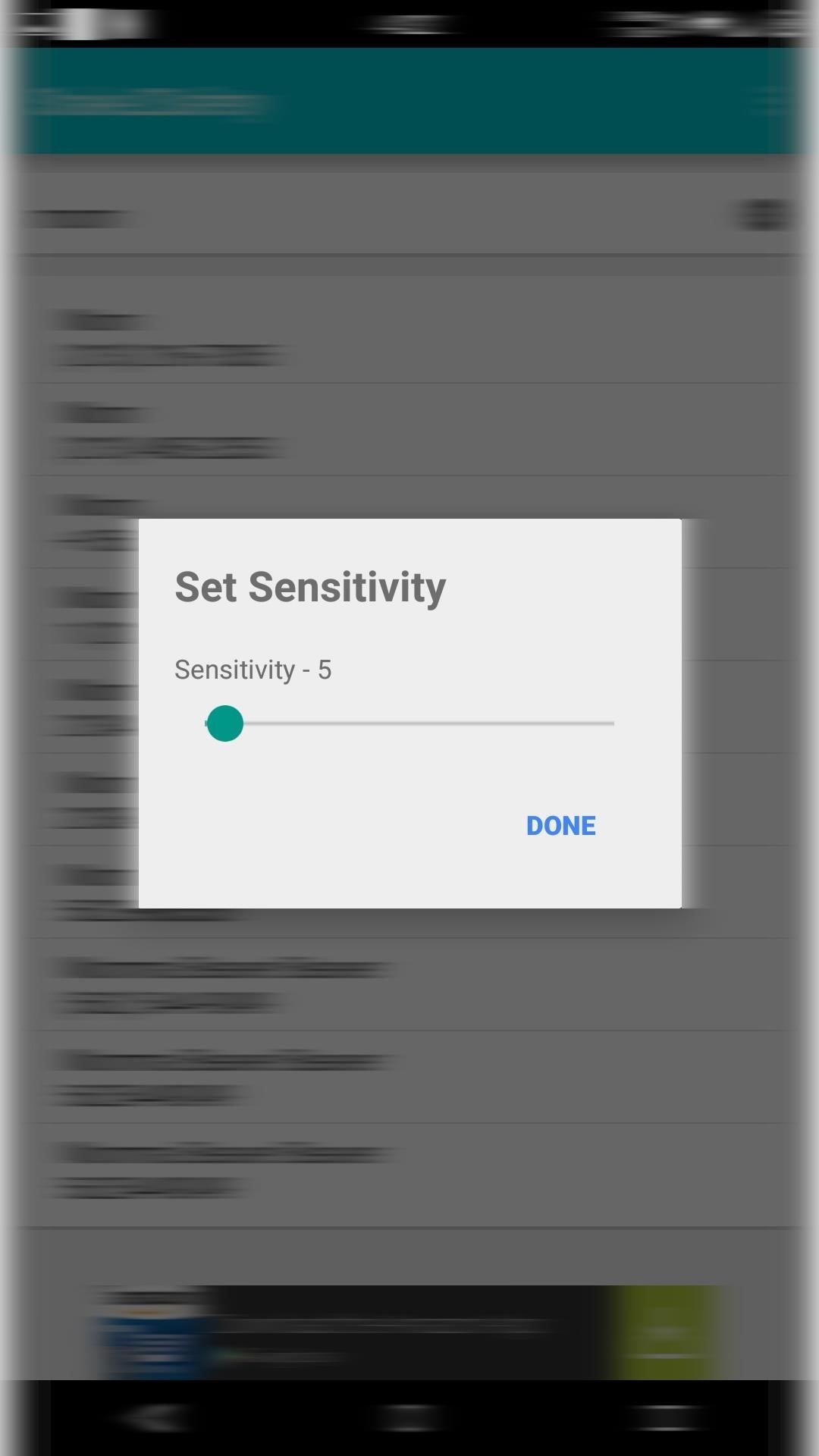
Step 3: Select Sensitivity LevelBefore the service is ready to run in the background, you will need to set your sensitivity level. The scale goes from 5 to 100, with 100 being the least sensitive to shakes. Keep in mind that this can be activated while your phone is locked, so set it to a lower sensitivity if you plan on holding your phone in your hand while the service is running. The app will display a persistent notification in your notification drawer the entire time it is running, but you can disable it by selecting "Hide Notification" from the action bar's overflow menu, then unchecking the "Show notifications" option. I would suggest you keep the notification on since it will make it easier to disable the service and prevent accidental messages and phone calls.Remember that this should only be active when you feel threatened by your surroundings because you wouldn't want to give your mother a panic attack like I did when testing this out.Let us know what you think of Shake2Safety in the comment section below, or via Facebook, Google+, or Twitter.


Step 1: Install Bar Launcher. To get app shortcuts in your notification tray, just install Bar Launcher (free on Google Play) from dev Johannes Obermair.As the name implies, a bar of customizable shortcuts will be added to your notification tray, and you can access the apps from anywhere you can pull down the tray.
Control Spotify Music from an Easy-Access Notification Center


According to Instagram, you'll only be able to see the 300 most recent posts (photos and videos) that you've liked. That's still a lot, but if you're an Instagram power user who likes hundreds of posts a day or if you feel the need to look for something you liked several weeks ago, you may be out of luck.
Facebook vs Twitter: Which is Best for Your Brand? | Sprout


Set Locale Set Locale and Language As we know that some rom of Android have no full set of language,sometimes it is hard to set the language you want in your phone.Or if the custom locale function in menu don't support your language,you can try this app!
App Locale 1.4 Download APK for Android - Aptoide


Its Android counterpart is called "Quick Settings," which provides much of the same functionality with a few bonuses. If you're curious about how this toggle menu works or miss having it before you made the switch from Android, you can test it out on your iPhone right now.
Get the Android settings on your iPhone for instant access to


Android 9.0 Pie moved the status bar clock from the right corner to the left to accommodate phones with notches, but there's one major downside for Samsung users: since no Galaxy phones have a notch, all this did was take away space for the notification icons that would otherwise start from the left
android - Controlling the Alarm icon in status bar - Stack


You can get most of the benefit of using a GUI by doing work on the server remotely. In other words my server is running Linux but 99% of the time when I need to work on the server I do it from my Windows 7 desktop or Windows 8 tablet using a combination of WinSCP, Putty, phpMyAdmin, and Firefox.
Installing plugins - MoodleDocs

Important: Back Up Your Galaxy Note 3's EFS & IMEI Data for


There's a known issue affecting some Nexus 5 users where the speaker volume is fairly low. This could be attributed to a manufacturing defect, which you could possibly fix with a hot needle, but if your built-in speakers and headphones seem muted, don't take your Nexus apart just yet.
How To Boost & Increase Speaker & Headphones Volume on Nexus


For email, send your message to: phonenumber@vzwpics.com That works for verizon wireless anyway. For Yahoo! Messenger I believe you just type in the phone number (no spaces) as the user name, but I am not sure about this.
send text messages from your computer? | Yahoo Answers


Here's how you can download IPA files from iOS App Store on your PC. No jailbreak is required for this to work.
Manage and Download Apps (.ipa) without iTunes - iMazing


How to Get Android Oreo Adaptive Icons on Any Android Phone. We come back with a new interesting tutorial where You can Get Android Oreo Adaptive Icons on Any Android Phone. All know about Android have lots of customization.
Adaptive Icons like Android Oreo on any android device using


In this video, we learn how to add the Google calendar button to toolbar. This will allow you to view your calendar to search for a specific event or appointment that is happening. This will keep your schedule more in line and organized than before! First, go to the Google screen and click on the calendar.
How to Share Google Drive Files or Documents - Guiding Tech


If Apple determines that an iPhone is not repairable, for example, if it has failed due to liquid damage or catastrophic damage where the iPhone has been disassembled into multiple pieces then Out-of-Warranty Service is not available and the iPhone will be returned." Total cost to replace iPhone will be full retail value of actual iPhone cost.
iPhone Water Damage: Ultimate Guide On How To Fix Liquid Damage


With Control Center, you can quickly take a picture, turn on lights, control your Apple TV, and more. You can even customize Control Center so you have instant access to the things you do most.
24 hidden iPhone settings you should know about | Popular Science


How to create a bootable installer for macOS. and MyVolume is the name of the USB flash drive or other volume you're using. Select Install macOS (or Install
How to make a bootable Mavericks install drive | Macworld