How To: Use a proxy to access websites blocked in your part of the world

How To: Use a proxy to access websites blocked in your part of the world
Can't get Hulu or BBC video where you live? A proxy may help. Setting up a proxy is an easy process and this video presents a complete guide. For more information, including a full demonstration and detailed, step-by-step instructions, watch this helpful home-computing how-to.


Mobile The secret to saving a wet phone or tablet. Rice? Hair dryer? Find out which reliable solution works, and how to prevent a phone or tablet from getting waterlogged in the future.
Your smartphone got wet. Here's what not to do first


If you're out and about and there's no free Wi-Fi available, you can use your iPhone's internet connection on another device, like a laptop or tablet. This feature is called "Personal Hotspot" on the iPhone (also known as "tethering"), and you can use it over Wi-Fi or USB.
TetherNoJailbreak - Wifi Hotspot Tethering app for iPhone


How To: The Best Way to Record Calls on Your OnePlus 3 or 3T How To: Record Phone Calls on Android How To: Record Your iPhone's Screen Without the Annoying Red Bar or Bubble News: Android's Best Build.Prop Tweaks for Better Speed, Battery Life, & Customization
Boost Performance & Battery Life on Your Galaxy S5 with These

How to Get on a site that's been blocked by your employer


This wikiHow teaches you how to stop apps that are running in the background on a Samsung Galaxy. Though it's easy to close apps, there's no way to prevent them from restarting unless you uninstall or disable them.
Samsung's Hidden App Lets You Drastically Change Your Galaxy

How to Program your Android phone to respond to voice


When your phone is unlocked, you can check your notifications by swiping down on the fingerprint sensor on the back. Double-tap to check phone When your phone is locked, you can check your notifications by tapping your screen twice. Lift to check phone When your phone is locked, you can check your notifications by picking it up.
How to Easily Control and Manage Volume on Android

How To SSH Into Iphone/Ipod touch (No WiFi) - YouTube

How to Remove, Block & Unblock Facebook Applications


How To: Use the Secret 'Vulcan Salute' Emoji on Your Apple Watch How To: Send Star Wars Emojis in Text Messages How To: Swap Out Your Samsung Emoji for the More Popular Google & iOS Icon Sets How To: Mikoto Gives Your iPhone YouTube Background Music, Contact Photos in Messages, & More
How to Use the Middle Finger Emoji on WhatsApp - Digiwonk


I send texts from my computer to my kids that have Verizon and a friend that has Altell and it works very well. I go to Yahoo messenger, and type in the phone number where it says type in mobile number and then click on the option that says "send SMS. A screen opens to type my messge and I just go ahead and do it.
How to send free text messages from your PC - Yahoo News UK


You can delete unnecessary apps to prevent your Watch from being cluttered for space. In addition, you can also hide some of the apps if you don't want to remove them completely. Even if you delete an app from your Apple Watch, it remains on your iPhone unless you decide to remove it from iPhone too.
How to Uninstall Apps from Your Apple Watch - Gadget Hacks


You can use most QR-code apps for reading bar codes, too, which can be convenient for in-store price checks. Scanning a product's bar code with RedLaser will bring up an item description, as
How to use a QR code barcode reader with a mobile phone - YouTube

Fixing iOS 7 Wallpaper Woes: How to Scale, Crop, Align, & Design the Perfect iPhone Background
Fixing iOS 7 Wallpaper Woes: How to Scale, Crop, Align, & Design the Perfect iPhone Background

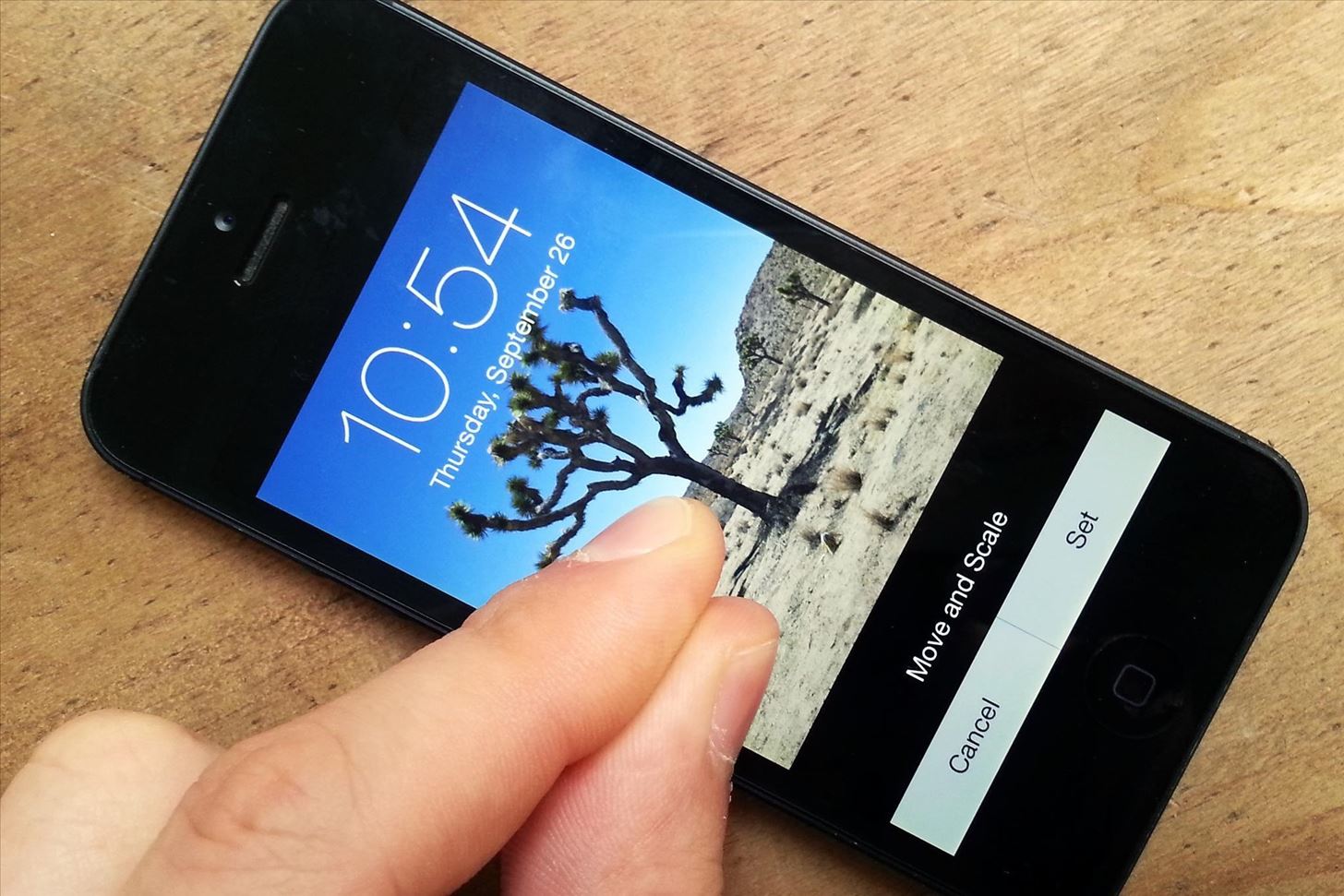
There are definitely some great things about iOS 7, but like any good piece of software, it's got some things to kink out—and how wallpapers work seems to be one of the biggest issues, since it's so much different than in previous iOS versions.We've seen tons of questions popping up all over iOS softModder about various wallpaper problems, from not being able to see white fonts clearly, to photos automatically zooming in when trying to crop them as wallpapers, to notifications blurring out the wallpaper on the lock screen. For the most part, there are easy fixes for all of these problems, and in this guide, I'm going to discuss them all. I'll also be including some general tips for making better custom wallpapers in iOS 7 on your iPhone, iPad, or iPod touch.
UPDATE: Upcoming Fix for Auto-Zoomed Wallpapers in iOS 7.1In the latest beta build of iOS 7.1, there's a fix for the resizing issue most of you have been dealing with, but it won't appear until 7.1 gets released to the public (rumored to be in March sometime). Until then, you should continue with the following fixes.
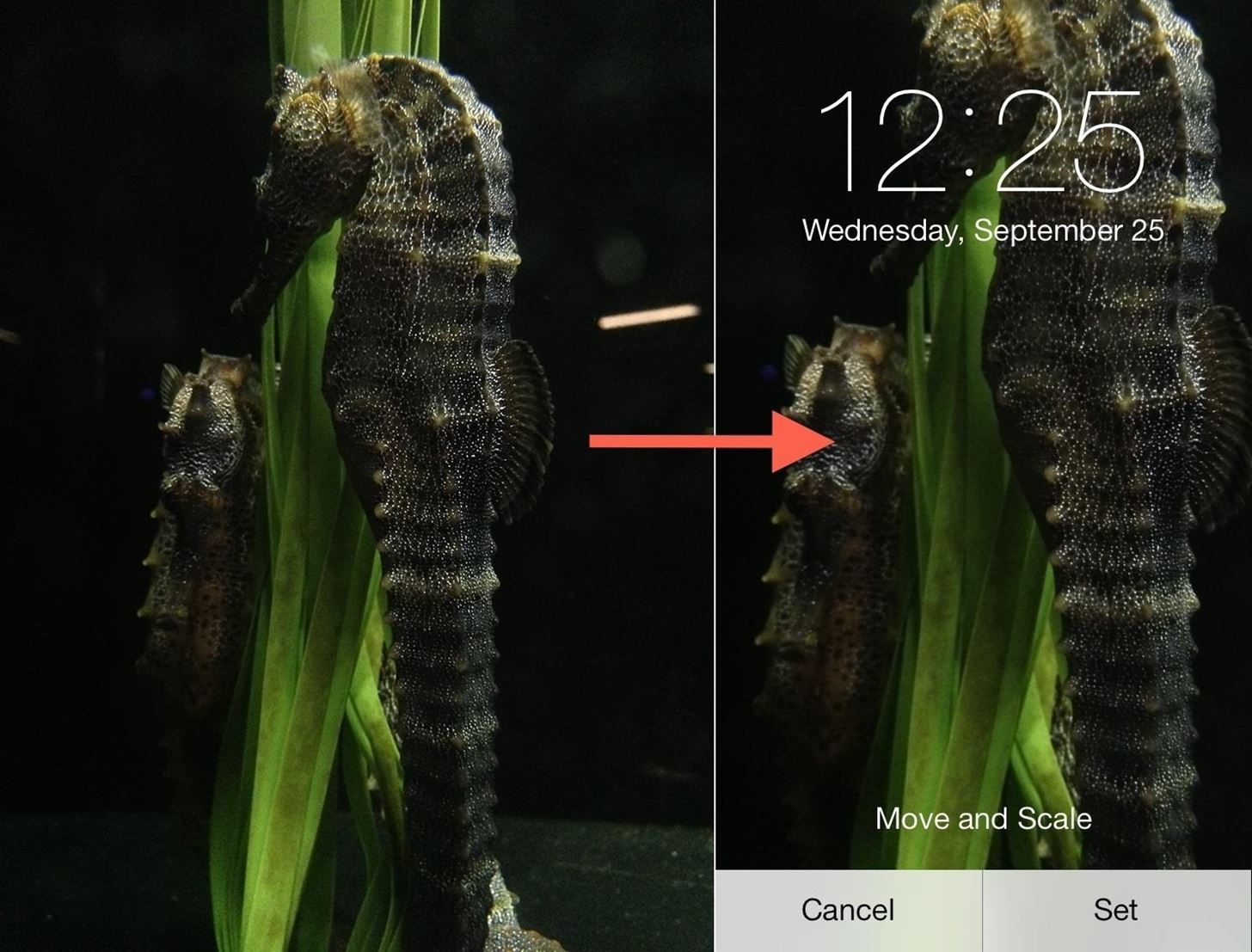
Why Wallpapers Auto Zoom When CroppingYou probably haven't noticed this issue if you're using one of the stock Apple wallpapers, but if you're trying to use your own photo as a wallpaper, it automatically zooms in when trying to crop it to perfection. And it's even worse if you're trying to use a square image with no real buffer around the subject, like one from Instagram. This is because of the parallax effect, which creates the illusion of a multilayered 3D system, with the background on a separate plane from text, app icons, clock, etc. When you tilt the device around, the gyroscope and accelerometer creates a change in the orientation of the different planes, therefore increasing your depth perception.Because of this effect, your wallpapers need more cushion on the sides to allow them to move freely around as you tilt your device.
What Apple Devices Use the Parallax EffectParallax wallpapers are only available for iPhone 4S, iPhone 5, iPhone 5S, iPhone 5C, and some newer iPad and iPod touch models. It does not work on the iPhone 4 or lower.
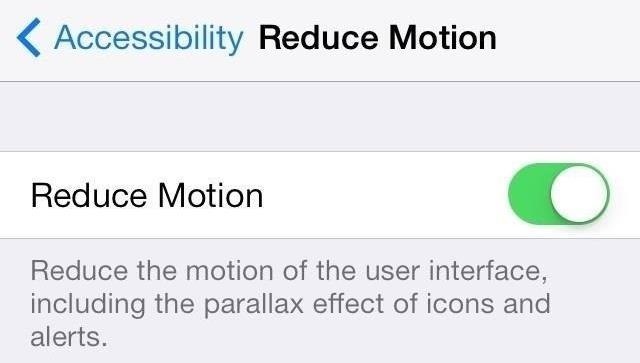
How to Disable the Parallax EffectIf you'd rather have more control over your wallpapers, you can easily disable the parallax effect in your settings. Actually, it doesn't disable it entirely, but it's close enough to let you crop wallpapers how you want them. Please enable JavaScript to watch this video.
If you want to disable parallax, simply head over to Settings -> General -> Accessibility -> Reduce Motion and turn it ON. Image via wonderhowto.com Like I said, this won't disable the parallax effect entirely, but it reduces it enough to make custom wallpapers more workable, and will stop the auto zooming when cropping.
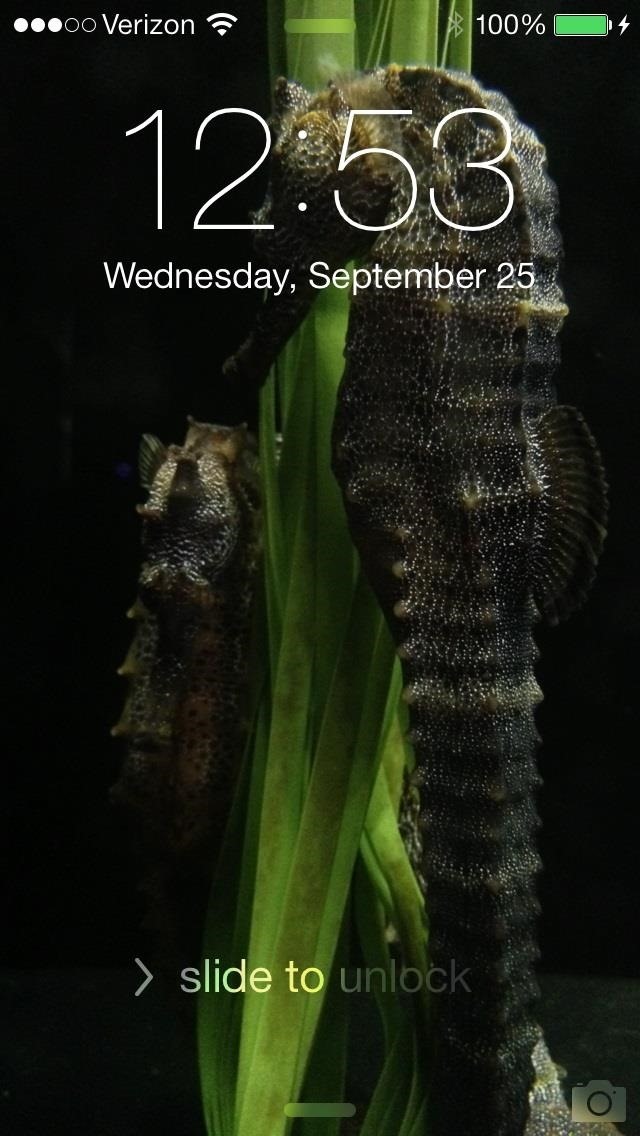
What Will Happen if You Disable Reduce Motion?If you cropped your custom wallpaper to perfection, then go back and disable the Reduce Motion setting, the parallax effect will come back and your wallpaper will be automatically zoomed in. If you enable it again, it should go back to normal.
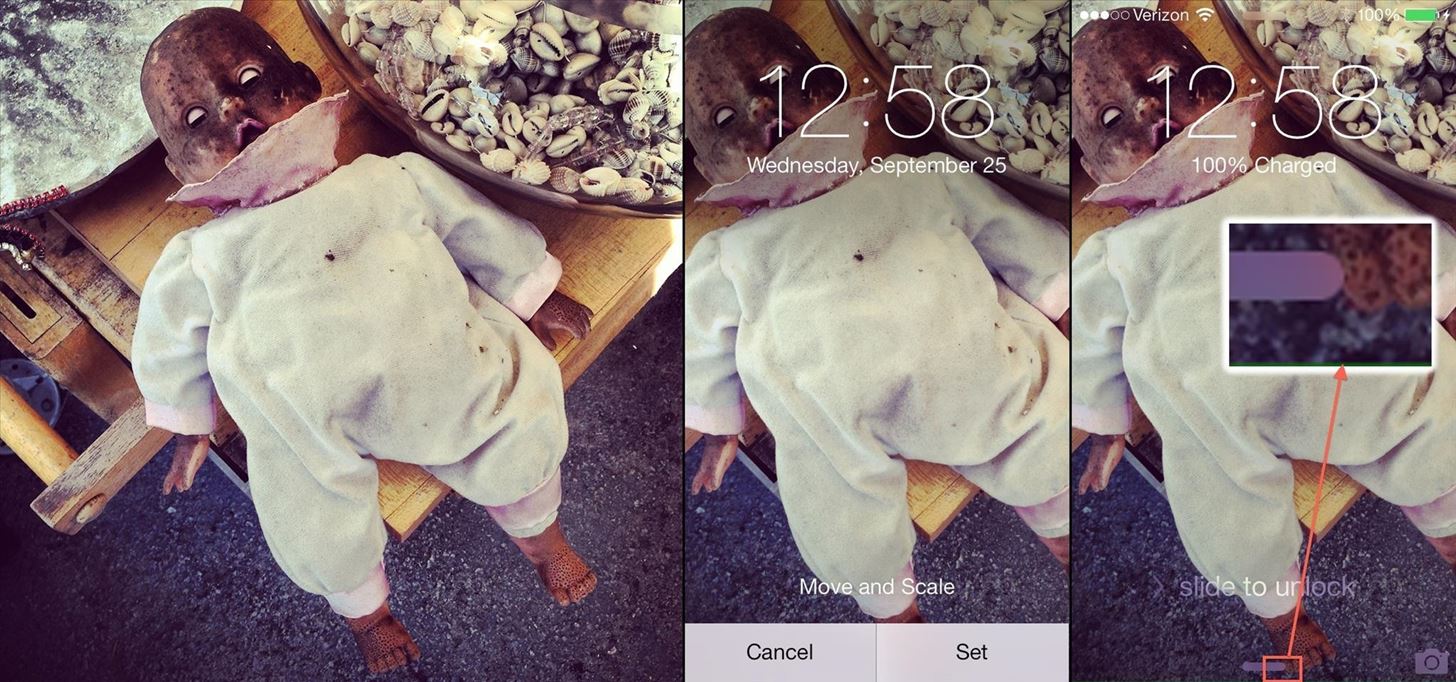
How to Fix the Green Bars Around Your WallpapersIf you have the parallax effect disabled and set a custom wallpaper, you may have noticed a green (or other colored) border around your wallpaper, or only on one edge.I've tested this with a few images, but it doesn't happen all of the time. It mostly occurs when you pinch to zoom out all of the way when adjusting the wallpaper, and happens more often than not with square images. You probably can't see the difference above, but let me zoom in for you. See it? The green bar?If this happens to you, just make sure to zoom in slightly when cropping and adjusting your wallpaper. You won't be able to see if it worked or not until you set it, since the gray bar at the bottom obstructs your view, but it's easy enough to readjust.
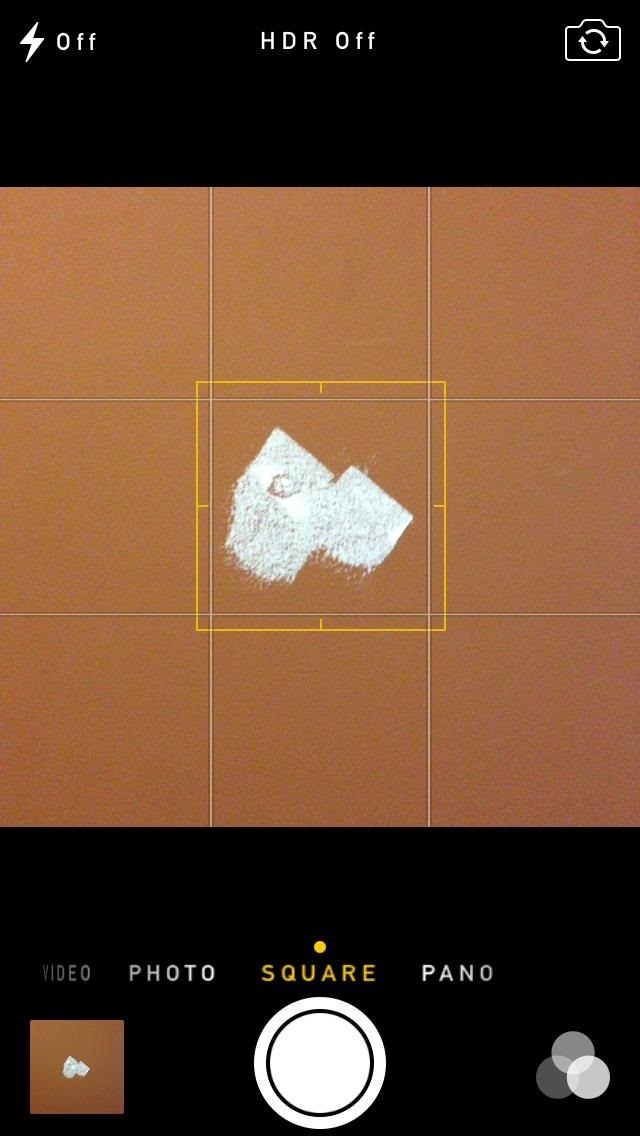
The Easiest Way to Make Your Own Parallax WallpapersIf you actually like the parallax effect, you can easily make custom parallax wallpapers when you take photos by just making sure your subject is in the center and you have a big enough border around it.The easiest thing to do is just take a photo with the new Camera using the Square feature. Make sure your subject is in the center of the grid and take the picture. It should work out quite nicely with parallax. Obviously, you can use Instagram too, or just crop the photo into a square using your iPhone's editing feature if you want to use a regular pic. Just make sure there is a decent border around your subject in the photo. This method might work differently on iPads, since they have a wider screen, so the best thing to do is play around until you find the perfect crop for your wallpaper.
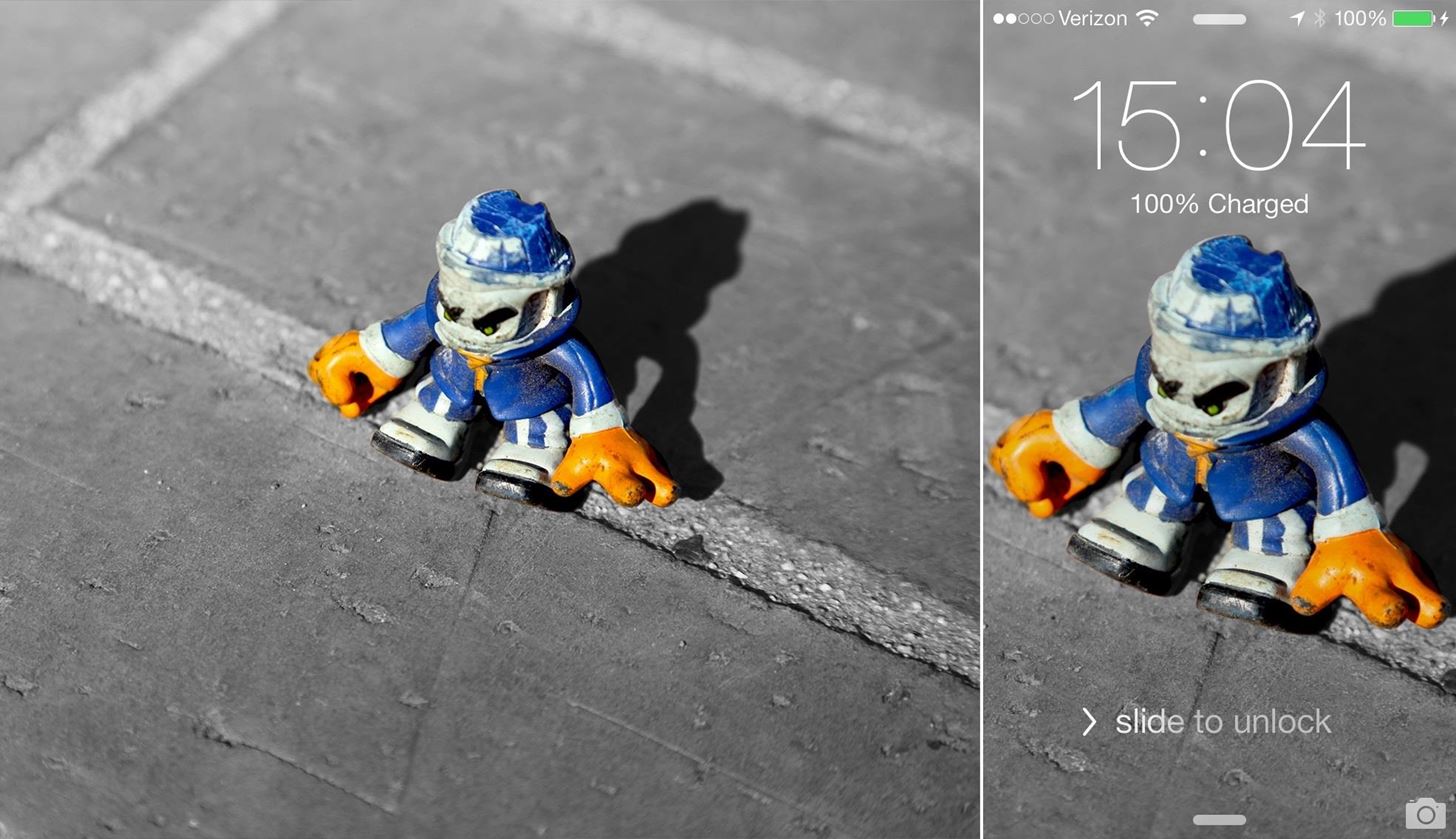
The Difficult Way to Make Parallax WallpapersLet's look at the following example without the parallax effect. It's pretty easy to get the toy figurine exactly where I want it—right in-between the time/date and unlock slider—using the photo I have. In order to get that figurine in the same exact place with the parallax effect on, I had to crop it into a square with equal space on each side of the figurine, just like if you were taking a square pic.Unfortunately, I did not have enough real picture on the top of the image to do this right and make sure the figurine ended up in the center where I wanted it. So I had to use the Clone Stamp tool to fill it in, and I'm not that good at it, so I decided to add a little Tilt Shift to blur out my crappy Photoshopping skills. But the end result is pretty much where I want it, only it took way more time than just taking the photo as a square. If you don't have Photoshop, GIMP, or another photo editing software, it's probably best to just stick with making sure you take photos as square with the subject tiny in the center.
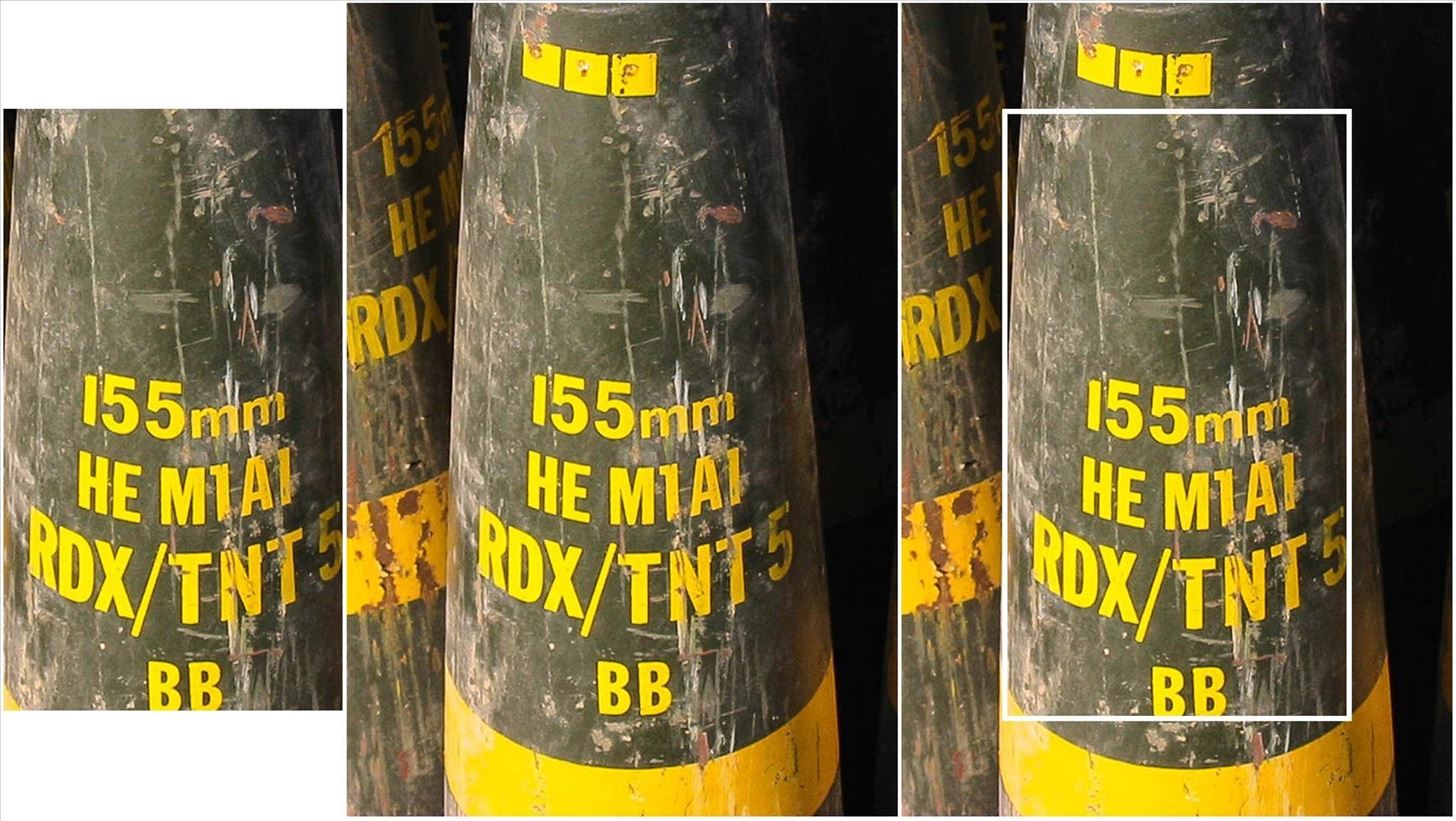
Don't Like Squares? Just Add 200 PixelsIf you don't want to have some leeway with your wallpapers, you can always just add 200 pixels to each side of your image to get the perfect parallax-compatible wallpaper.Let's say I want the picture below on the left to be my wallpaper. It's sized for my iPhone 5 at 640 x 1136 pixels. To get it to look exactly like that on the lock screen, I'll add 200 pixels to each side, for 1040 x 1536, which gives me the image in the middle. The result is pretty good, but if you want the exact same crop, you'll probably still have to zoom in a little, and even then it won't be perfect.Below on the left is the original 640 x 1136 image cropped from above, with the untouched, unzoomed version on the lock screen (a little zoomed out), and the zoomed in version on the far right (a little closer to the original). So, it's not a perfect solution, and my least favorite, since a square is so much easiest to manage, but it gets the job done.If you follow this rule, use the below sizes for reference.iPhone 5/5C/5S: 1,040 x 1,536 iPhone 4S: 1,040 x 1,360 iPad (3rd, 4th gen): 1,936 x 2,448 iPad Mini: 1,168 x 1,424 iPod Touch (5th gen): 1,040 x 1,536
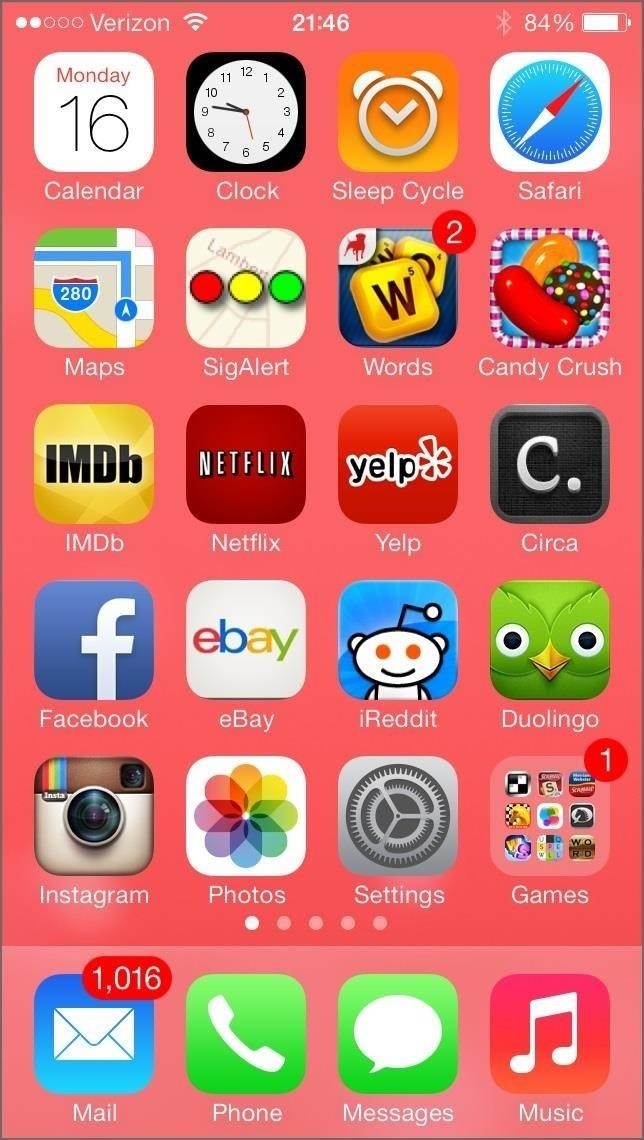
How to Get Black Text on the Home ScreenSome users, like myself, hate the tiny white text that appears on the Home screen. It's not so bad on the lock screen, but it can pretty hard to read app and folder names on the Home screen. Images via wonderhowto.com Thankfully, you can make the text black by simply picking the right wallpaper. Apple included 40 stock wallpapers choices, but only 8 of them will let you change the text on the Home and lock screen to black—and none of them are dynamic wallpapers.These are the only ones you can use for dark fonts.
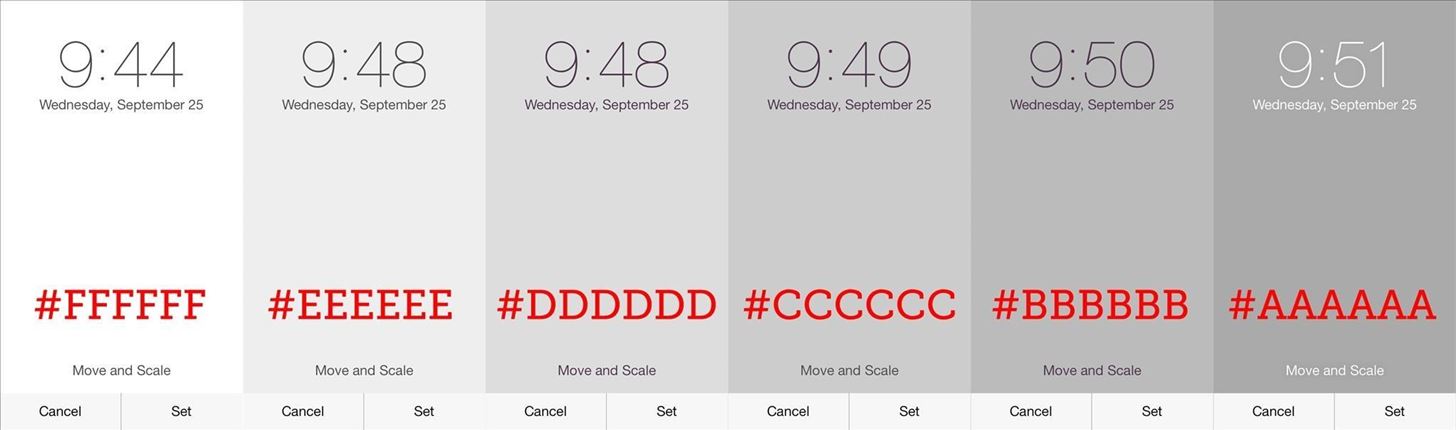
The Colors Needed in Custom Wallpapers for Black TextIf you want to get black text on the Home or lock screen using your own custom wallpapers, it gets a little tricky, and it pretty much depends on what colors are dominant.Going off of hex color codes, if you're using a white or grayish wallpaper, BBBBBB through FFFFFF will give you black text, while AAAAAA and darker will give white. As for more vibrant colors, just make sure the color is as light as possible to get black text to appear. I'd go through and test them all, but I'm afraid it would take me a long time, since there's at least 1,500 more colors.
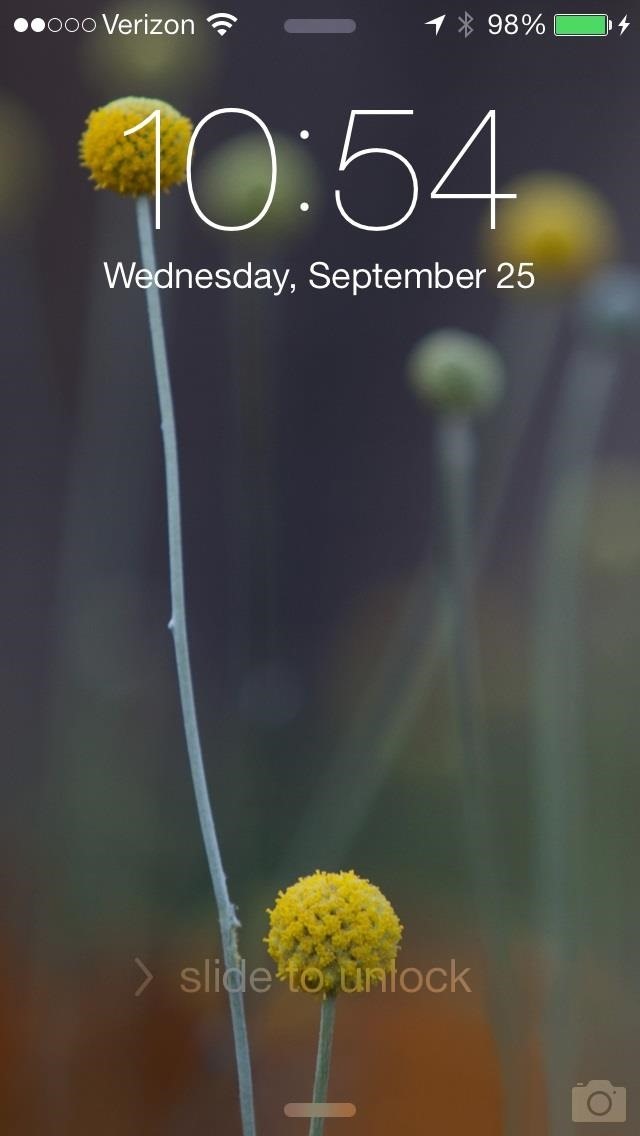
The Blurry Lock Screen Wallpaper ProblemSo, when you first updated to iOS 7, you probably noticed the notifications work differently with your wallpaper on the lock screen. Whenever you receive a new alert, the lock screen wallpaper blurry. This is because of the translucent notification panel, which adds prominence to the new alert. Additionally, your wallpaper will become blurred on the unlock screen, as well, not just for new notifications.Technically, there is no way yet to get rid of the translucency effect on the lock screen so you can see the wallpaper in all its glory. At least, not yet.
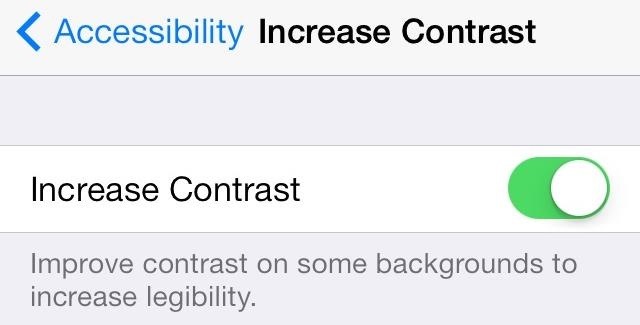
How to Get Rid of Blurry Lock Screen WallpapersHowever, there is another option available if you don't like your brilliant background blurred. Go to Settings -> General -> Accessibility -> Increase Contrast and make sure it's ON. This will disable the wallpaper on your lock screen altogether when you get a new alert or are unlocking your device, replacing it with a gray background instead. If you'd rather have a blurred out wallpaper, simply head back and decrease the contrast in your settings.
More iOS 7 Tips!There's a lot to learn about the new iOS 7 for iPad, iPhone, and iPod touch, so make sure to visit our iOS 7 tips section to explore all of the new features and hidden tricks. Also make sure to check out the 15 most annoying things, 18 coolest new features, and 18 sneaky privacy-betraying settings in iOS 7 that every iPhone user should know about.
Submit Your Favorite Custom Wallpapers Below!If you made a really cool parallax wallpaper for your iPhone, iPad, or iPod touch, please share it below in the comments for the rest of us to download and use. What's the best one you've got?And if you have any issues, feel free to ask them below or visit the iOS softModder forum for help.


There's no such thing as a perfect Android keyboard. Some, like Swype, have gesture typing down to a science, but lack in predictive technology. SwiftKey, on the other hand, boasts awesome next-word prediction, but less than stellar gesture typing.
How to Automatically Change your Keyboard on a Per-App Basis


Ótima notícia, assassinos de zumbis! A sequela de Zombie Gunship, Zombie Gunship Survival, finalmente chegou para dispositivos iOS e Android como um lançamento disponível para download nas Filipinas - o que significa que, com um pouco de ajustes, você pode jogar o novo jogo em qualquer país.
Mobile Gaming - ZOMBIE GUNSHIP SURVIVAL - YouTube


Preview your sound profile once you've completed the test, then hit "Save" to wrap things up. For a full guide on Adapt Sound, check out the link below. Don't Miss: The Galaxy S9's 'Adapt Sound' Feature Makes Your AKG Earbuds Sound Even Better. 3. Set the Volume Buttons to Control Media by Default
[Tricks] AKG earbuds sound much, much better after Adapt


In this tutorial, I'll be showing you how to automatically "hibernate" problematic battery-hogging apps—even without root! A recent update to the app "Greenify" allows for automatic hibernation
Stop Android apps running in the background [ How To ]


You can tick the box next to Mute volume key "beep" if you don't want to hear the indicator sound each time you adjust the volume level. Step 3: Using the Volume Slider The volume slider will automatically appear as an overlay on top of your status bar when you press one of your Nexus 5's hardware volume keys.
YouTube iOS App Removes Apple's Obtrusive Volume Indicator in


You won't find large packages of gunpowder until late in the game, but take advantage of them once you do. Use ammo defensively - You might feel like you're wasting ammo if you shoot at a zombie and fail to kill it. Don't. Sometimes one or two shots will stagger a creature long enough that you can rush past them unscathed.
Shoot Projectiles from One Device to Another with DUAL

Thanks for watching
[Tip] Disable these settings to improve Gboard performance on


As this new rule means that in the future Huawei's phones will not be supported by Google, the company is rumored to be shifting to its own operating system, something that has been previously
Huawei May Be Developing Its Own Mobile Operating System


How To: Get the best backgrounds for iPod Touch or iPhone without jailbreaking How To: Get a video wallpaper on iPhone/iPod touch How To: Get a live, animated wallpaper for your jailbroken iPhone or iPod Touch How To: Jailbreak iPod Touch/iPhone 1G, 2G, 3G, or 4G
How to Put the Wallpapers on Your iPhone & iPod Touch


Lumenec LED Strip for Signs - Applying the strip - YouTube


iOS 11 brings hundreds of new features to iPhone and iPad including an all new App Store, a more proactive and intelligent Siri, improvements to Camera and Photos, and augmented reality technologies to enable immersive experiences. iOS 11 is also the biggest release for iPad ever and adds powerful new multitasking features, a new Files app and more ways to use Apple Pencil.
iOS 11.0.1 / iOS 11.1 To Bring Apple Pay Cash Feature, Not


To Break a Phone Addiction, Turn Your Screen Gray Apr 28, The Atlantic Selects What Does It Mean to Support 'Free College'?
These 4 Apps Can Help Cure Your Smartphone Addiction


I've seen the future and it is math less and it is awesome and it is this PhotoMath app that solves math problems just by pointing your phone's camera at them. It's like a cross between a text
Use your phone's camera to solve equations with PhotoMath


I am connected to the internet on my Palm Centro. How do I program my phone to sync e-mail from Gmail? - Answered by a verified Cell Phone Technician
How can I connect my Palm Treo to the Internet? - Ask Dave Taylor
How To: Install Sony's Sketch Drawing App on Your Nexus 7 Tablet for Improved Doodling

How To: Install Sony's Sketch Drawing App on Your Nexus 7 Tablet for Improved Doodling
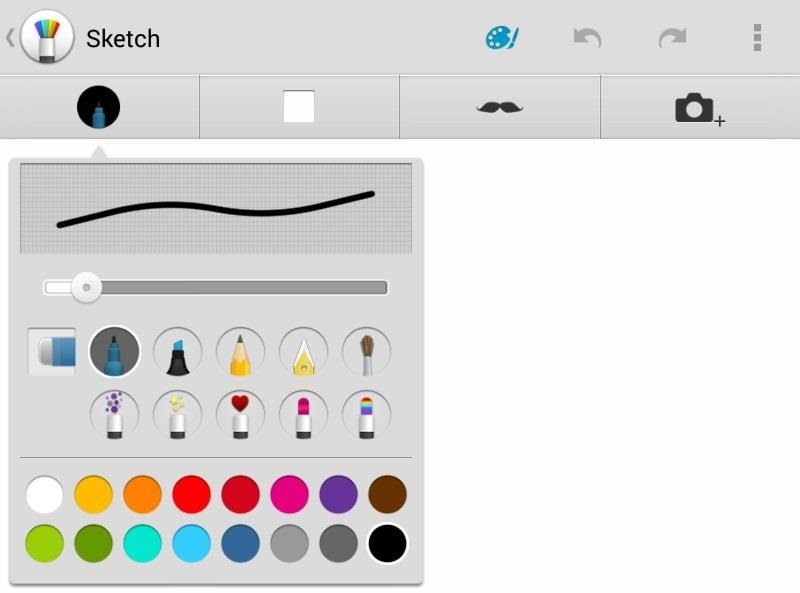
"What's the point of having a Nexus 7 for drawing if all of the drawing apps suck?" That's what my girlfriend said after buying her new Nexus 7 tablet. She draws a lot and was hoping to hone her doodling skills on it, but she's right—most of the drawing apps available on Google Play aren't that great.She actually gave up even looking, but I remembered that Sony has a really great drawing app called Sketch preloaded on their newer Xperia line of Android devices. Unfortunately, just like the PlayStation Mobile Store, only certain Sony devices can install Sketch.But as always, we softModders have a way around that. If you're an artist and want to give Sony Sketch a try on your Nexus 7 tablet, here's how you get it installed. Please enable JavaScript to watch this video.
Prerequisites: Android OS & Custom RecoveryThe version of Sketch that we're using was ripped straight from the new line of Sony Xperia devices by dev Ben Ling, so any softModder can get their hands on it. However, there are a few prerequisites for your Nexus 7.Must be running Android 4.2.2 or higher (Jelly Bean 4.3 tested) Must have a custom recovery installed Users with Android 4.1.X or lower will not be compatible, so be sure to upgrade first before trying to install Sony Sketch.

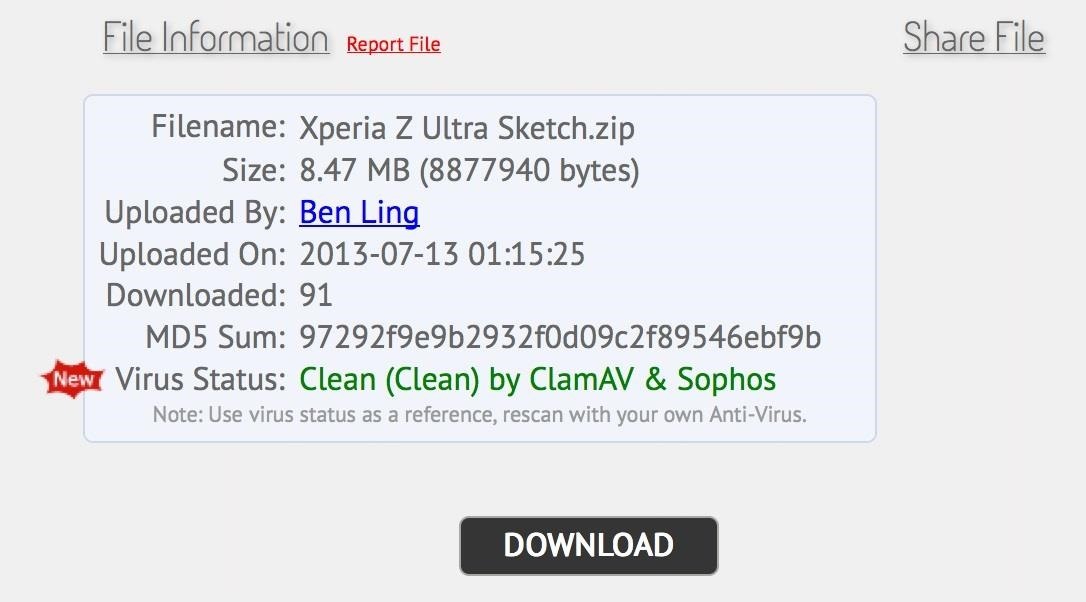
Step 1: Download Sony's Sketch AppSince this is ripped from a Sony Xperia Z Ultra smartphone, you won't find this on the Google Play Store. To download the ZIP file, click on this link. Since this is a ZIP file and not an APK, you do not need to have Unknown Sources checked in your Security Settings.
Step 2: Flashing the ZIP FileAfter it's downloaded, boot into your custom recovery (CWM or TWRP).Choose install ZIP from SD card Choose the "Xperia Z Ultra Sketch.zip" file Flash the file Reboot Once you're fully booted, open up the app drawer and you'll find Sony's Sketch app installed. It's as easy as that.

Using Sony's Sketch AppThere are a bunch of brushes and effects to choose from. Everything from different tips, colors, and also thicknesses can be picked and used. Choosing your canvas color is also an option if you prefer something other than white. Funny faces, eyes, noses, mustaches (you get the idea) can be placed on to images for those who want a bit of comedy in their doodles. Importing images you already saved on to your tablet is also an option if you want to edit or draw on them. Lastly, here's something my girlfriend drew after having a few minutes with the Sketch app. Anyone into ducks? Overall, this app was great to use and the UI was simple and uncluttered. No complaints, really. Be sure to give this a try and see if you like it. Tell us in the comments section below!


The Material Design color system supports alternative colors, which are colors used as alternatives to your brand's primary and secondary colors (they constitute additional colors to your theme). Apps can use alternative colors to establish themes that distinguish different sections.
Unlock a Hidden Network Strength Meter for Your iPhone's


The UCSC Genome Browser provides visualization tools for a large genomic database spanning more than 100 animals. In addition to providing a viewer for a large number of annotation datasets including mRNA alignments, gene predictions, epigenetic marker mapping and expression data, new features include a tool to
UCSC Genome Browser - YouTube


For optimal charging, use the approved wall charger for your device. But if you can't be wired to a power outlet, you can still charge your smartphone or tablet battery with an accessory such as the mophie® powerstation™ or a mophie pack case. 2. Pamper your battery. Keep the ports where your battery plugs into your device clean.
How to Tell if Your Samsung Battery Is Bad in 2 Seconds Flat


If you see a fun-looking Lens in a friend's Snap or somewhere else on Snapchat, you might be able unlock it yourself! To unlock a Lens from a Snap… Swipe up on the Snap to view Context Cards ; If there's a card with the Lens on it, tap it to try it out! Sharing a Lens with a Friend . To share a Lens you've unlocked with a friend…
Why your Snapchat filters not working and how to fix it


Feel like you aren't getting the best picture from your shiny new TV? Want to make sure you're watching movies as they were intended to be seen? Here's what you need to know about HDTV picture quality, and how to adjust your set for the best image.
LG 32GK850F Review | PC Monitors


— A smartphone can be a lifeline in a storm, but it's useless without power. Fortunately, there's never been more ways to keep a smartphone juiced up. 1. Charge up every laptop in your home. If
How to keep your smartphone charged and other tips during a


How To: Trigger Anything from Anywhere with Just a Phone Call The Easier & Better Way to Control, Track, & Locate Your Lost or Stolen Samsung Galaxy S3 Remotely
Passcode Exploit: These 2 Bugs Let You - Samsung Galaxy S3


Dropped your iPhone in water? Our 5 emergency tips show how to dry out a wet phone and fix any damage So your iPhone has got wet. You dropped it in the bath, or maybe the sea. And now you want to
Apple leak shows how it decides to repair or replace iPhones


Facebook Freezer will start its work and within few minutes, victim's Facebook account will be freezed. Note: For Facebook Freezer to freeze account, victim must logout from his Facebook account. So, use Facebook Freezer whenever you find victim not online on Facebook. I hope this you can now hack facebook account using this Facebook Freezer
How to hack Facebook account | Facebook Freezer - Blogger


How to Record a Video of Your Screen on Android. If you have been looking for a video screen recorder for Android, you have come to the right place.In this post we will examine the best options to create a video recording of your screen, without rooting your device.
How to Get Back Lock Screen Customization in Android Lollipop


Windows 10 has been well received by users and tech writers alike, but parts of Microsoft's new privacy policy are raising eyebrows due to concerns that they could be 'spying' on what users do.


Developers Aravind Sagar and Priyan Vaithilingam have ported this functionality to devices running KitKat, so you don't have to wait to try out Lollipop's Smart Lock features. In addition, their app replicates the look and functionality of 5.0's all-new lock screen, so it's definitely worth a look.
How to Enable Lollipop's Color Blindness Features - Android


How To: Upload Videos to Multiple Video Sites Like YouTube, Facebook, & Dailymotion at Once Using Vid Octopus News: Axon 7 Oreo Beta Now Open to US Users — Here's How to Get It How To: Here's How Your Apps Will Get Better Now That They Have to Target Oreo
YouTube


If you forgot your password or username, or you can't get verification codes, follow these steps to recover your Google Account. That way, you can use services like Gmail, Photos, and Google Play. Note : If you use an account through your work, school, or other group, these steps might not work.
If you forgot your Apple ID password - Apple Support


Turn Your Phone into a Lightsaber! iPodHacks142. Loading Unsubscribe from iPodHacks142? Jedi fight with their lightsabers WRONG: Star Wars - Duration: 11:10.
Star Wars game turns your phone into a LIGHTSABER

How To: The Best Way to Transfer Photos & Videos from Your DSLR Camera to Your iPhone

How To: The Best Way to Transfer Photos & Videos from Your DSLR Camera to Your iPhone

When you want to post a breathtaking landscape or picture-perfect portrait that you just took with your DSLR camera to Instagram, Facebook, or some other social platform, there's an easy way to do so — even if you don't have a computer handy, which is typical when you're out and about.Even if you're not out and about, there's a good chance you do most of your photo editing on your iPhone or iPad since there are hundreds of paid and free photo editors and filter apps in the iOS App Store. Transferring photos and videos to your computer first, then using AirPlay to put them on your iPhone, is an overly complicated process. Plus, you'd need your computer, and that's clunky.Don't Miss: How to Transfer Media from Your iPhone to Your Windows 10 PC Most newer DSLRs from Canon, Nikon, and other manufacturers come equipped with Wi-Fi functionality, and with that turned on, you can connect to your DSLR access point via your iPhone's Wi-Fi settings. However, you have to use the same app from the manufacturer of your camera to view and transfer your photos and videos this way. Wi-Fi isn't always fast either, especially if you shoot in RAW.
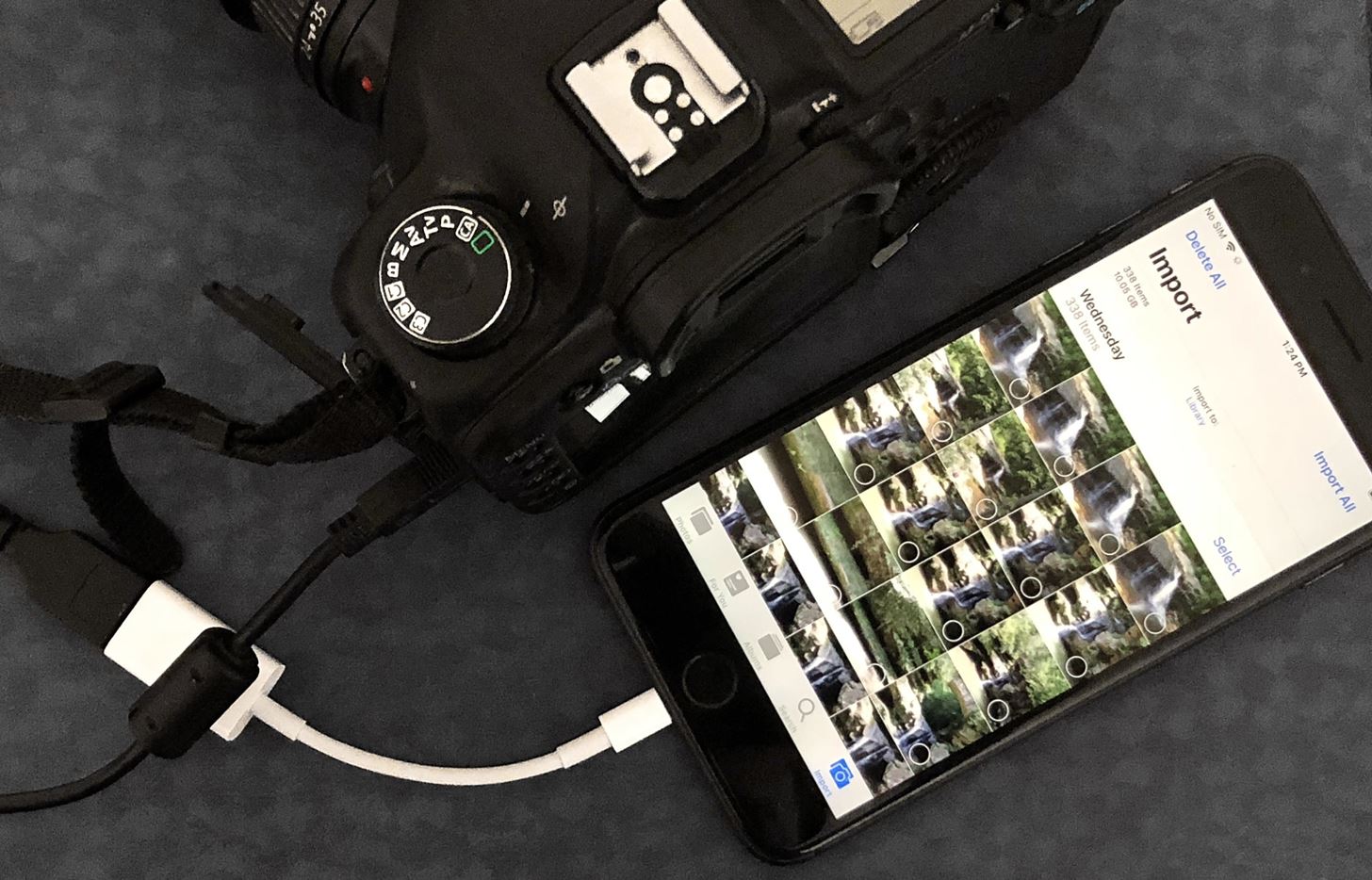
The Best Way Is to Use a Wired AdapterWireless is always preferred, but in this case, a wired adapter makes more sense; It's faster, it's tiny, it uses Apple's own import interface, and it will import directly into the Photos app. As far as adapters go, there are three categories you can choose from that Apple sells, and which one you get depends mostly on what kind of DSLR you have and just general preference. There are cheaper third-party products, but they are not as reliable as Apple's, which aren't all that expensive to begin with.

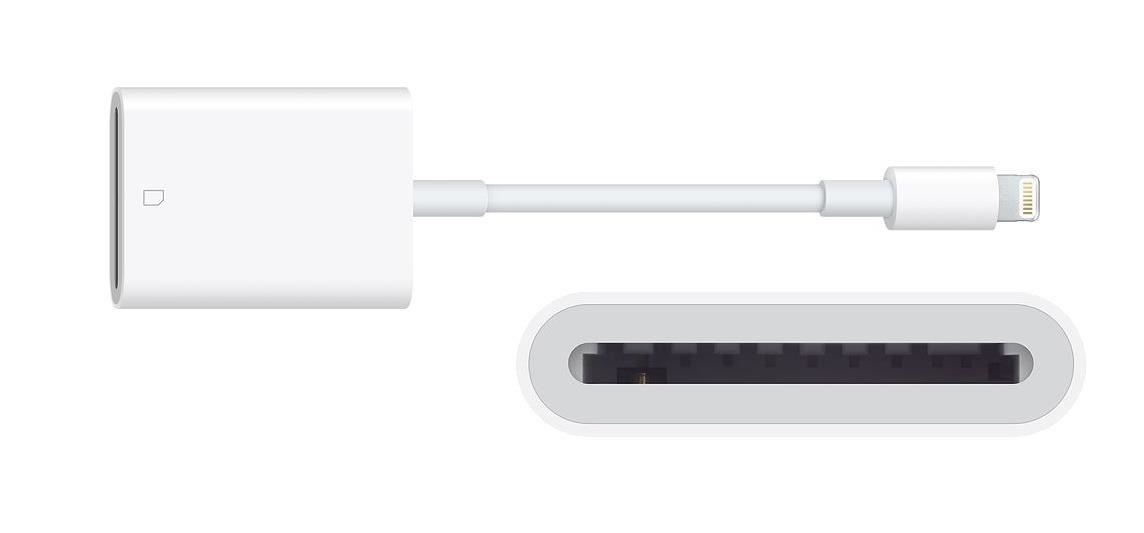
Option 1: Lightning to SD Card Camera ReaderApple's Lightning to SD Card Camera Reader connects right to the Lightning port on your iPhone, and you insert your camera's SD card into the reader slot. If you have a point-and-shoot instead of a DSLR, you can use an SD card adapter with your miniSD or microSD card.This will not work with CompactFlash (CF) cards.Once the card is inserted, Photos is automatically opened where you can view, download, and delete files. For iPhones, you get USB 2 data transfer speeds, though some iPad models can get USB 3 speeds.Apple's Lightning to SD Card Camera Reader, MSRP $29 — Buy from Amazon | Apple | Best Buy Apple's Lightning to SD Card Camera Reader. Image via Apple

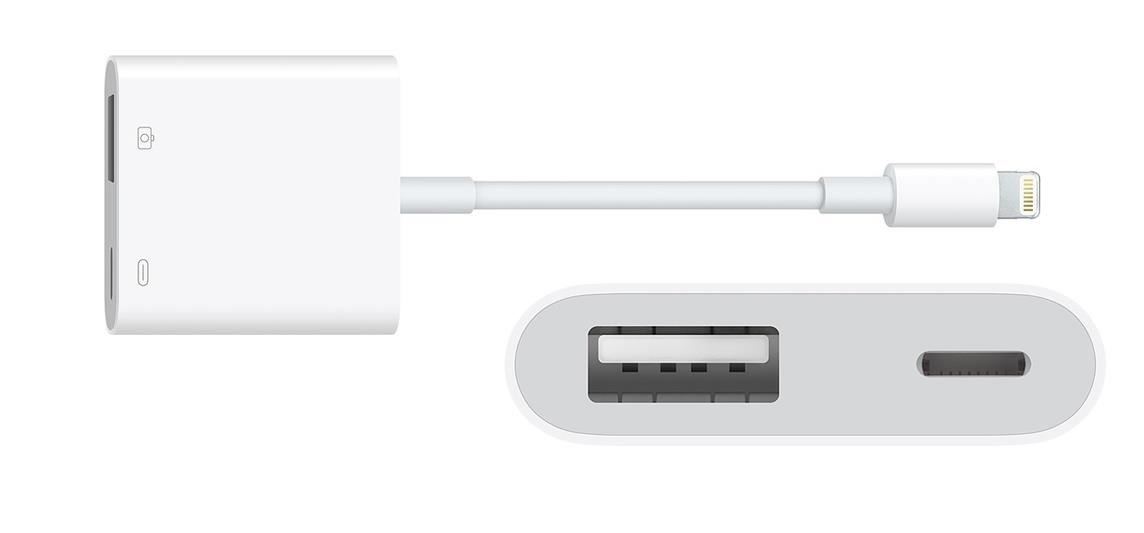
Option 2: Lightning to USB 3 Camera AdapterApple's Lightning to USB 3 Camera Adapter connects right to the Lightning port on your iPhone, and you insert a USB-to-Mini-USB cable into it. That cable would go right into the Mini-USB port on your DSLR.Once you turn on your DSLR, the Photos app opens where you can view, download, and delete files. If you want to use a third-party card reader instead of your camera to read the card, you'll likely need to plug in a power source to the adapter's Lightning port to power the card reader. One benefit of this is that it will charge your iPhone at the same time.For iPhones, you get USB 2 data transfer speeds, though some iPad models can get USB 3 speeds.Apple's Lightning to USB 3 Camera Adapter, MSRP $39 — Buy from Amazon | Apple Apple's Lightning to USB 3 Camera Adapter. Image via Apple

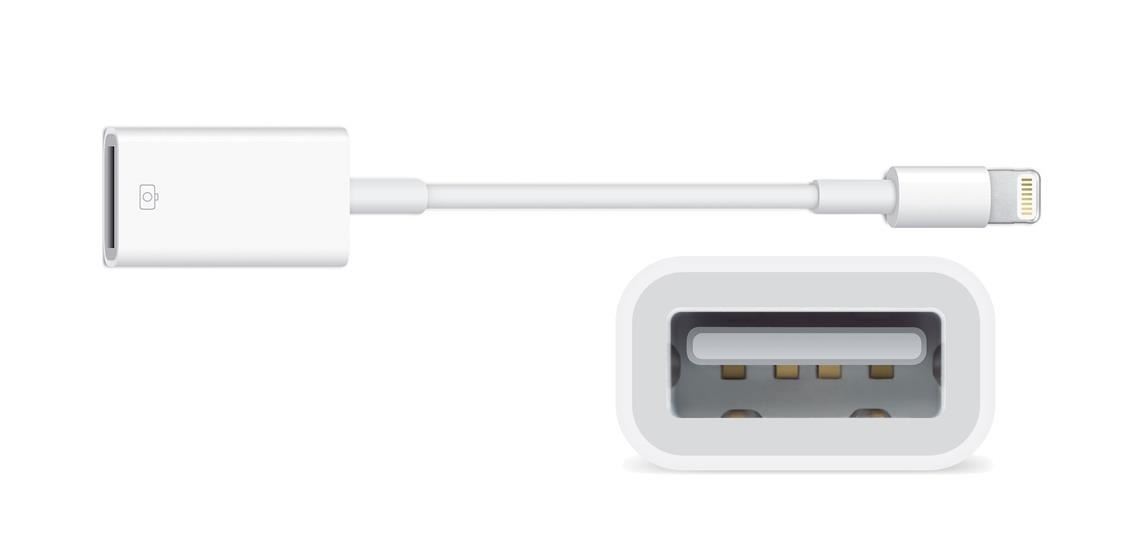
Option 3: Lightning to USB Camera AdapterApple's Lightning to USB Camera Adapter connects right to the Lightning port on your iPhone, and you insert a USB-to-Mini-USB cable into it. That cable would go right into the Mini-USB port on your DSLR.Once you turn on your DSLR, the Photos app opens where you can view, download, and delete files. Unlike the adapter above, you can't connect third-party card readers to this unless they are powered somehow. For iPhones, you get USB 2 data transfer speeds.Apple's Lightning to USB Camera Adapter, MSRP $29 — Buy from Amazon | Apple | Best Buy Apple's Lightning to USB Camera Adapter. Image via Apple For all three of these options, you need to be running iOS 9 or higher. Also, each of these adapters supports JPEG, RAW, and other standard photo formats, as well as H.264, MPEG-4, and other SD and HD video formats.

Connecting Your Card to Your iPhoneThese cables are all plug-and-play unless you're using a third-party card reader, in which case you would need a power source of some sort. For the rest of this article, I'll be using the Lightning to USB Camera Adapter as an example.After I connect the adapter to my iPhone, with a Mini-USB cable between the adapter and my DSLR, I would just need to turn on the camera to turn it into a certified card reader. Since my camera uses CompactFlash cards, this is the easiest way for me to work, since the Lightning to SD Card Camera Reader doesn't accept CompactFlash cards. Image by Justin Meyers/Gadget Hacks Immediately after powering up the camera, the Photos app's "Import" screen will load on the iPhone. Depending on how many pictures and videos you have on the card and the format you took them in, the media may load right away or take a few moments. Once it's loaded, you can begin importing and deleting files.

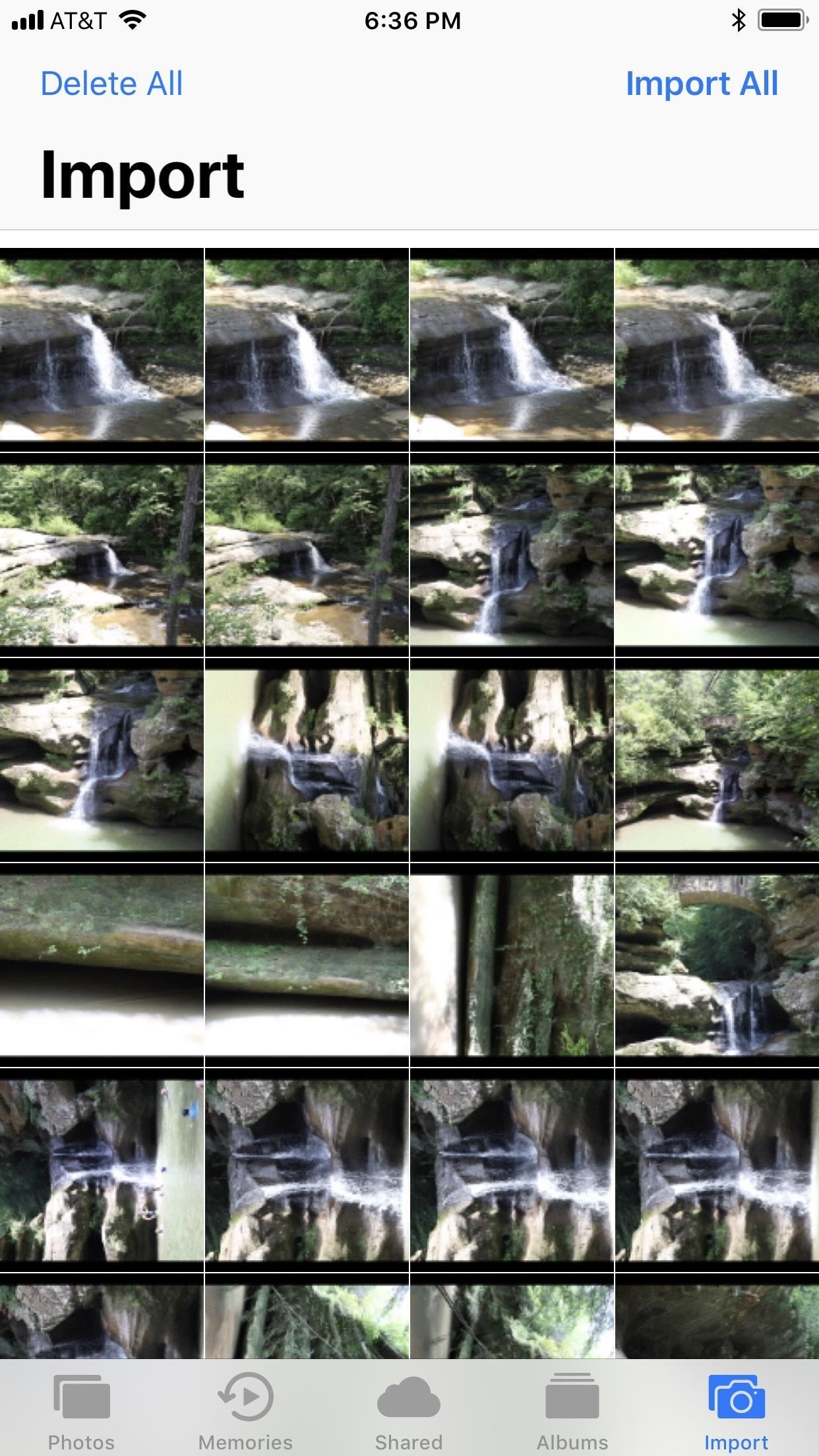
Importing Photos & Videos in iOS 9 – iOS 11If you're still running iOS 9 through the latest version of iOS 11, the import interface and options are pretty barebones. You can't preview photos in full screen, only as the thumbnails you see right away. Your options are limited to "Import All" or you can tap photos and videos to "Import" just those. If selecting certain content, after you tap "Import," you'll have to tap "Import Selected" on the pop-up, but you can also choose "Import All" if you changed your mind. Once you've imported them to your iPhone, you'll be presented with the option to either "Delete" the photos off your card or "Keep" them. If you try to "Import All" media after you've already downloaded a few images or videos from the card, you'll be able to "Skip Duplicates" or just "Import All," including the ones you already imported.

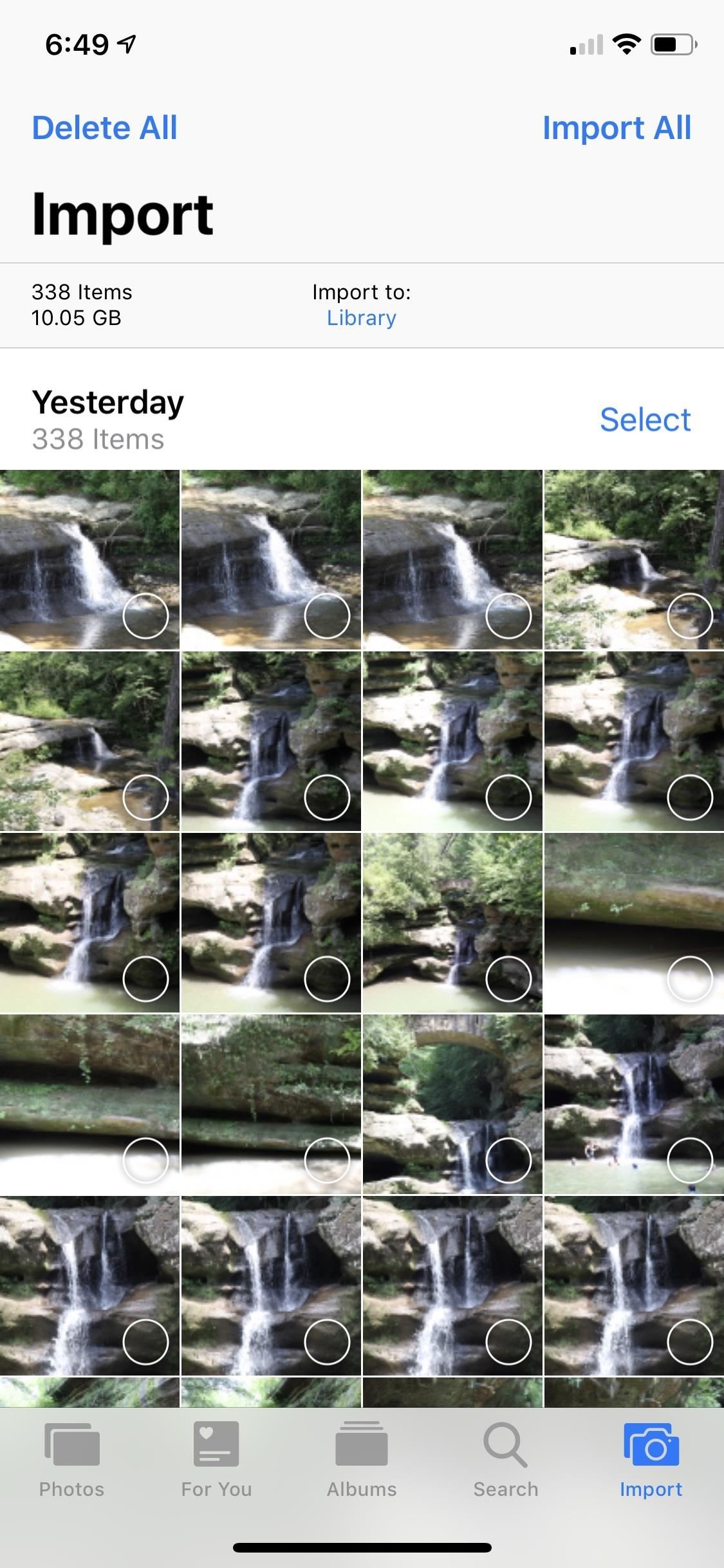
Importing Photos & Videos in iOS 12As you can see, there's not much to Photos imported in iOS 9, iOS 10, and iOS 11, but iOS 12 includes a lot of improvements. Photos and videos load much faster in the new importer, plus it makes it easier to see what's already been imported to your iPhone from the card with an "Already Imported" section. Aside from that, photos and videos are organized by date, which is a nice change if you use your card throughout the week or even month.Don't Miss: 30+ New iOS 12.2 Features for iPhone You Don't Want to Miss After tapping "Import All," the import will begin, but you can stop it at any time. If you'd rather pick and choose media, you can do like before and tap on the photos and videos you want to download, then tap "Import." Also, like before, you can "Delete" or "Keep" photos and videos on the card after it's finished importing. By default, photos and videos that you import will end up in your "Camera Roll" album, which is labeled "Library" in the importer. However, you can change the destination folder by tapping on "Import to." You can choose whatever folder appears in the list or you can create a new album specifically for this import. If you can't decide which media to transfer to your iPhone, iOS 12's importer includes a new preview mode. Press firmly to peek at an image with 3D Touch, then press deeper to enlarge it. If you don't have 3D Touch (Haptic Touch will not work), long-press to jump into large previews. You can then swipe left or right to browse through all your photos and videos in the bigger view, and tap each one to select or deselect it for importing.Don't Miss: The 10 Best New Features in iOS 12's Photos App for iPhone Once you start importing files, you don't have to remain on the importer screen. It works in the background, so you can go read your emails, iMessage someone, check up on the news, or whatever else you want to do.Another benefit that iOS 12 brings to Photos is the ability to edit RAW photos. It won't be like editing RAW photos on your Mac or PC with Photoshop or Lightroom, but it's a great tool for quick edits before posting to social media or sharing in messages. However, RAW photo editing is limited to iOS devices with an A9 chip or higher. That means no RAW editing on the iPhone 5S, 6, or 6 Plus. If you AirPlay one of the imported RAW files to your computer, it'll still be in the original RAW format. However, if you edit the RAW file in Photos, then it will instead become a JPEG, so keep that in mind.This article was produced during Gadget Hacks' special coverage on smartphone-based video creator tips for filming and editing. Check out the whole Videography series.Don't Miss: Must-Have Phone Accessories for Photographers in 2019Follow Gadget Hacks on Facebook, Twitter, YouTube, and Flipboard Sign up for Gadget Hacks' daily newsletter or weekly Android and iOS updates Follow WonderHowTo on Facebook, Twitter, Pinterest, and Flipboard
Cover photo and screenshots by Justin Meyers/Gadget Hacks


The feature pulls in images you've taken at a particular location to give you an overview of your travels. Here's how it works. How to view your location history in Google Maps | Android Central
Yes, Google Maps is tracking you. Here's how to stop it


Okay, okay, so maybe the ab selfie isn't exactly a thing. But since people love to take photos of their abs and post them on Instagram, this term should totally exist. You should honestly never post a photo of your abs on your feed. Sure, you might have the most beautiful abs ever and people might love seeing them.
Instagram 101: How to Add More Than 30 Hashtags to Your Posts


How To: Automatically Change Keyboards for Specific Apps on Android How To: Improve Gboard Accuracy by Deleting Suggested Words You'd Never Use How To: Use the Secret 'Vulcan Salute' Emoji on Your Apple Watch News: Gboard Makes Finding Emojis Even Easier on iPhone
The Best Keyboard Apps for Android - March 2018


Auto Tech Android Auto vs. Google Assistant Driving Mode vs. Android Automotive OS: All the ways Google hits the road. We take a look at the similarities and differences between Google's various
Google Android Auto Cars - Business Insider

How do I add or change my profile picture? | Facebook Help


A Spotify Premium account in Mexico City currently costs 99 pesos (around US$5.23), a much more affordable alternative to piracy than buying CDs or other physical formats at the standard price of
Newly public Spotify is now bigger than Twitter, Snap and


If you pre-ordered your Samsung Galaxy S4, it might very well be possible that you're reading this on your brand spanking new Android device. As is commonplace with the release of popular smartphones, rooting instructions are usually released simultaneously.
ElementalX: The Only Custom Kernel You Need on Your Nexus 5


How To: Recover Deleted Spotify Playlists How To: All of Siri's New AirPlay 2 Commands — So You Can Control Music Playback from Your iPhone Just by Talking News: Create a Fire Mixtape with Your Friends Using Spotify's Group Playlists
More People Use Spotify Than Live in the Entire Country of

How to Get Android's New "L" Keyboard on Your HTC One or


Go to Settings > Facebook > (Your Name) > Delete Account & delete your account. Step 2: With your account detached from your iPhone. Open Instagram > Setting > Share Settings > Connect to Facebook. Follow the normal steps to "Allow Instagram to Post on your behalf." Step 3: Go back to your iPhone's Settings & recconect your Facebook Account to
How to Connect My Instagram to Twitter | Chron.com


So well lets begin the full guide to Unlock Bootloader On Any HTC Smartphone. If you are always opting to install Root, Custom Recovery or any Custom ROM, then your phone must be unlocked. In this guide, So here is the full guide to Unlock Bootloader on Any HTC Smartphone. If you unlock bootloader you may void the warranty.
Unlock Your Bootloader & Delete Tamp… | HTC One (M7)


How to Change Your Default Snooze Time. Unfortunately, I have some bad news. There is no way to change the snooze time for alarms in the Clock app. This has been asked for many times over since the invent of the iPhone, but it's not a big enough problem to break that 9-minute tradition, even if it's just letting us customize the time ourselves.
How to Change Snooze Time on iPhone Alarm - iPhone Topics


iPhone X FaceID Unlock Without Swiping Up? If there was no swipe up we would never see notifications. Will that be a setting that can be changed in the future for
How To: Instantly Unlock Your iPhone with Face ID — No Swipe


Thankfully, MoviePass isn't the only movie ticket subscription service available. We've compared all the best plans on the market to help you find the one that's right for you. News : Cinemark Movie Club Is a Great Subscription for Occasional Filmgoers & Popcorn Addicts
15 Clever Uses for Expired Debit, Credit, Gift, and

How To: Test a starter capacitors in your car

How To: Test a starter capacitors in your car
If you're looking to see if you're working with a live, dead, or leaking capacitor, this video is just what you need. You'll want to have a multimeter and you need to remember: capacitors can be dangerous things. They hold and release electricity very rapidly, so you can get shocked or electrocuted if you don't exercise caution. A starter capacitor is used to start motors, and the easiest way to test a starter capacitor is with a multi-meter. Find out why any capacitor is a potentially dangerous device with help from an auto mechanic in this free video on auto part testing. Please enable JavaScript to watch this video.


Google can search almost anything on the web. This includes content that may be deemed unsuitable for younger members of your household. If you don't want to have pornographic websites or any sexually explicit results come up on your web searches, you can opt to block porn from Google.
How to Block Useless Websites from your Google Search Results


Closing All Tabs on Android Tablets. It's a little quicker to do this on an Android tablet, like the Nexus 7. The tabs are displayed like they would be on your desktop, so tap and hold the "X" on any one of the tabs and a "Close all tabs" option will appear. Unfortunately, the Chrome version for iPad requires you to close each tab individually.
How to Close All Open Tabs in the Chrome iPhone App - Solve


In Jeri Ellsworth latest nerd lab vid notes, she explains how to make an IR detection device by "quenching" copper-doped zinc sulfide (ZnS:CU) glow powder and how to measure temperature with thermally-quenched phosphors. Practical uses of Quenching in Phosphors
Practical uses of Quenching in Phosphors - YouTube


1. RetroArch (Multi-Console) If you're looking for a one-stop shop, RetroArch is like the Swiss Army knife of emulators. Rather than supporting only one specific platform engine, this app allows you to download "Cores" that emulate many different consoles, from Atari to the first-gen PlayStation.
How To: Rip Original PlayStation Games to Play on Your


How To: Craving a Mario Kart Gaming Experience on Your iPhone? Give This Soft Launched Game a Try By Amboy Manalo; iOS & iPhone; Gaming; Space Ape has soft-launched Go Race: Super Karts, giving you a fresh take on mobile racing games by blending in elements found within the classic Mario Kart series and RPGs for some seriously addicting gameplay.
Super Mario Run 101: How to Conserve Battery Life While


Your app might have the feature on it but if it isn't available for your account, you may not see it. Google says a user must have 'English' set as the local language on their phone in order to use Google Lens but that doesn't guarantee that you'll see it. Google Lens. Update the Google Photos app on your Android phone or iPhone.
How to Use Google Lens to Identify Objects Using Your


We would love to know about the apps you use to automate your Android device? Do you use Tasker? If you do, and if you have some cool Tasker Profiles that you think will prove useful to others, feel free to share them with us in the comments section below. Image Courtesy: The Verge
Tasker 101: 5 Useful Profiles to Help Get You Started with


News: Always-Updated List of Phones That Will Get Android Pie How To: Watch Apple's WWDC 2018 Keynote for the New iOS, ARKit & Apple Watch Reveals News: The Latest Razer Phone 2 Leaks Suggest Project Linda Might Actually Happen
Gadget Hacks News — Page 5 of 55 « Gadget Hacks

How to Build a Mini Altoids BBQ « Hacks, Mods & Circuitry


How to Use Instagram Stories. Henry T. Casey · how can you join in the fun of Instagram Stories? First, which adds zooms and music to your Stories. Open Stories mode, and swipe the slider
Learn How to Use All of The New Instagram Stories Features

How to set up Hotmail on a Mac - Macworld UK

How To: Beat level 3-10 of Plants vs Zombies HD for the iPad

How To: Beat level 3-10 of Plants vs Zombies HD for the iPad
Need help figuring out how to beat level 3-10 of PopCap Games' Plants vs. Zombies for the iPad? See how it's done with this gamer's guide, which presents a complete walkthrough of the process. With the right technique, the level is easy to beat. For more information, and to win stage 3-10 of this whimsical tower defense game yourself, watch this helpful video guide. Please enable JavaScript to watch this video.


If you are not able to transfer a file with Bluetooth, depending on the file type and size you may be able to email it to your phone's email address, set up through your provider. See Email to a Cell Phone for more information. Sometimes MP3 files will not work on older phones or on phones that restrict file types.
How to Share Files Over Bluetooth in Windows 10 - groovyPost


The iPhone X is almost here, and if you were actually managed to pre-order one that ships this week, your new smartphone may already be in transit. If you still don't have a tracking number but
HOW TO : Track Your iPhone X Pre-Order Shipment Status


Tired of retro screen recording? Image via Shutterstock. Previously I showed you the best way to record your Android phone's screen on KitKat. For that your phone needed root access, an AOSP
How to Record Screen on Android Lollipop - techaudible.org


How to add a shortcut to a website on Android Firefox lets you create shortcuts on your Android's home screen so you can quickly access your favorite websites. It eliminates the need to type a web address every time you want to access the site - just tap on its shortcut to open the page.
2 Android Apps to Create Custom Homescreen Shortcuts


User Testimonials: Why People Are Switching from iPhone to Pixel News: Google Pixel Reviews Are Out—Here's What People Are Saying Apple vs. Samsung: How Do the iPhone 8 & 8 Plus Compare to the Galaxy S8 & S8+? News: At Last, Someone Came Up with a Way to Run Android on an iPhone
Google Pixel 3A Review: The $400 Smartphone You've Been

'Metaphor' Exploit Threatens Millions of Android Devices—Here


News: Thanks to Google, iPhone Users Can Finally Pick a New Frame for Their Live Photos How To: Unlock Your iPhone's Secret Camera Level News: 20 Cool New Features in iOS 11.2 for iPhone News: iOS 11.2 Beta 4 Released for iPhone with Mostly Under-the-Hood Improvements
Still Missing Live Photos on Your Android? Try These 3 Apps


Deliver Quietly: These notifications appear in the Notification Center, but don't show up on the Lock screen, play sounds, or show a banner or badge icon. Turn Off: This turns off all notifications for a specific app. To turn this back on, go to Settings > Notifications, select the app, and tap Allow Notifications.
How to Stop Notifications from Interrupting Music on iPhone


PS: If your Android device already has an LED light to use as a flashlight, find out how to activate it using the power button. Related How To : The Flashlight That Finally Lets You Adjust LED Brightness on Your Samsung Galaxy Note 2


Unfortunately, there are no magical ways to make the ultra-sonic fingerprint scanner work faster on the Galaxy S10; however, there's always a possibility that Samsung can roll out an update
How To Improve The Speed Of Fingerprint Scanner On Your


A cloud music player app allows you to upload your music collection to the cloud online and then access your music files directly from within the player. This allows you to build a massive music collection without having to worry about storage. Here is a list of the top 10 cloud music player apps for Android phones and tablets:
VLC 101: How to Stream Videos from Your Favorite Cloud


Do you want to change your Facebook profile picture without sharing an update? Or want to change your cover photo without giving feed to your friends? Here's is a simple way to update your profile
How To Change Profile Picture On Facebook [Android] - YouTube


The beta firmware for OnePlus devices lets you record calls from the stock Oxygen OS dialer, but this feature is never included in official updates. This is likely due to legal issues with recording calls in some jurisdictions, but thankfully, there's a way to get this feature without having to run beta software.
16 tips for shooting better video on Android | AndroidPIT

How To: Use a PS3 controller with a Motorola Xoom Android

How To: Use a PS3 controller with a Motorola Xoom Android
Get more out of your Motorola Xoom Android tablet. Hook up a PS3 controller and enjoy all the games you can play with emulators on your tablet. Follow these instructions to make your Motorola Xoom Android a superior gaming machine by hooking up a PS3 controller. Please enable JavaScript to watch this video.


Need help figuring out how to print your MyHeritage family tree? If so, you'll be well served by this video tutorial from the folks at Butterscotch, which presents a complete breakdown of the process. For complete details, and to get started printing out your own family tree, watch this video guide.
How to Print Your Family Tree - Family Tree


Android: Google and Android are typically a package deal. Even if Samsung or Sony makes your phone, you'll still find it loaded with Google Maps, Gmail, Chrome, YouTube, and all the other apps
How to use Google search to find your lost Android phone - CNET


The iPad's got some stiff competition these days, especially from Android, who plans to invade the tablet market with their high-end mobile operating system. And they're off to a good start with the Samsung Galaxy Tab, available from AT&T, T-Mobile, Vodafone and Verizon Wireless, along with other carriers.
How to Use Your Samsung Galaxy Tab As a Phone: 6 Steps


I mostly switch between Android devices, and Google makes it incredibly easy to transfer everything from one phone to another. If I move over from an Android device to an iPhone, I use the
How to switch from Android to iPhone and iPad | iMore


Since the Pixel 2 and the Pixel 2 XL both having a screen that uses OLED technology, the battery usage while the Always On Display feature is rather minimal. We're talking like 5-15 minutes of less screen on time per day by having the feature enabled. However, there is also the worry of burn in since there are pixels being lit up at all times.
How to turn on Always on display Pixel 3 and Pixel 3 XL


Mobile Apps; How-To. Type in style: How to change your Android keyboard By Sarah You may have never thought to change the keyboard on your Android device. Why would you? The one that came with
How to Get Emoji Suggestions with Any Android Keyboard


After spending way too much time researching all over forums and blogs on how to customize Google docs forms and how I could use my own CSS styling. I set out to create my own form that fully embellishes all that I wanted to accomplish.
Style Your Google Docs with CSS - lifehacker.com


How To: Make an Impossible-to-Find Doortop Safe to Hide Secrets, Cash, & Other Valuables How To: This Easy DIY Money Indicator Light Makes Sure You Always Have Cash in Your Wallet How to Make Ferrofluid: The Liquid of the Future How To: Make Marble Photo Magnets
No Smartphone Stand? Just Use Your Wallet - WonderHowTo


Firefox is also widely used on Android and provides an incognito browsing featur. To enable it, follow the steps below: Open Firefox, tap the three dots icon in the upper-right corner and select New Private Tab from the menu. It's also possible to directly open a link in a private tab.
Private browsing: how to use incognito mode on Android


Google Play Games seems like the perfect place to incorporate a classic gaming cheat code Easter egg. To unlock the hidden achievement, install Play Games from the Play Store and then navigate to
There's a secret text adventure game hidden inside Google


Fortunately, getting your own personal ringtone set-up on the HTC Desire HD is simple as - In this guide, we show you exactly how it's done. First, you'll need to find some ringtones you like. To make things as simple as possible, ensure your ringtones are DRM-free MP3 files. Also, they should typically be 30-seconds or less in length.
How to set a custom ringtone on your HTC Desire HD - Phone-Info